
Unit 1 · Computational Problem Solving
Computational Problem Solving
Learn how computers solve problems systematically using computational thinking, algorithms, decomposition, abstraction, pattern recognition, and logical reasoning.
Introduction
Every day we solve many problems, such as deciding the shortest route to school, organizing our daily schedule, or calculating expenses. Humans often solve these problems naturally using experience and reasoning. Computers, however, cannot think like humans. They require a clear and precise set of instructions to solve every problem.
Computational Problem Solving (CPS) is the process of analyzing a problem, breaking it into smaller parts, designing an efficient solution, and expressing that solution in a way that a computer can execute.
Before writing a program, programmers first understand the problem, identify the required inputs and outputs, design an algorithm, and finally convert the solution into code using a programming language.
Computational problem solving is one of the most important skills in computer science because it develops logical thinking, analytical ability, creativity, and systematic decision making.
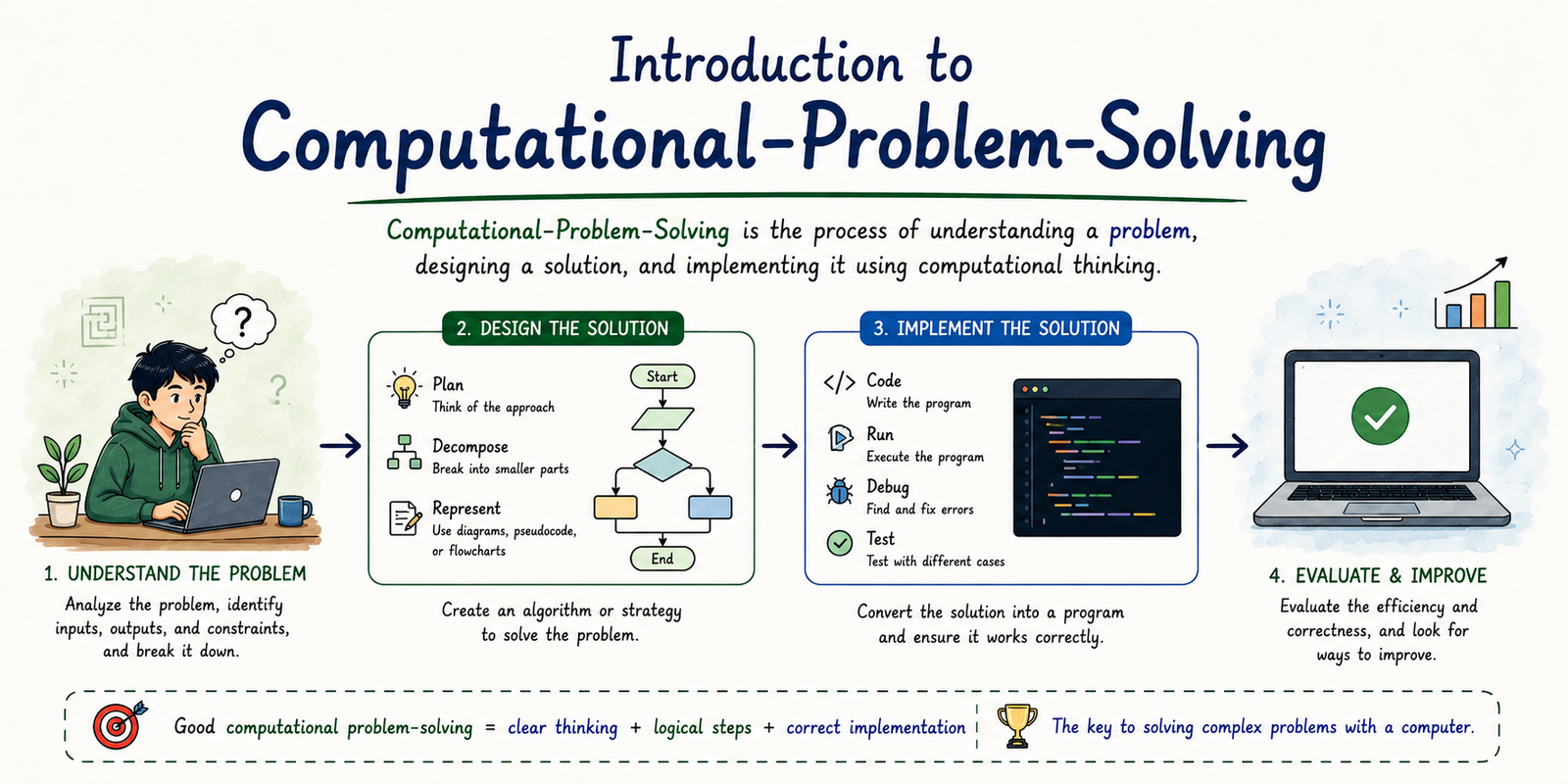
Table of Contents
What is Computational Problem Solving?
Computational Problem Solving is a systematic method of solving problems using concepts from computer science. It focuses on creating solutions that are logical, efficient, reusable, and suitable for implementation on a computer.
Instead of solving a problem randomly, computational thinking encourages us to understand the problem, divide it into manageable parts, recognize patterns, ignore unnecessary details, and design a sequence of steps that leads to the correct solution.
Definition
Computational Problem Solving is the process of analyzing a problem, designing an algorithmic solution, and implementing it so that a computer can execute it efficiently.
Importance of Computational Problem Solving
Computational thinking is useful not only in programming but also in everyday life. It helps us make logical decisions, improve efficiency, and solve complex problems systematically.
Logical Thinking
Develops analytical and logical reasoning skills for solving real-world problems.
Better Decision Making
Encourages structured thinking before taking action.
Efficient Programming
Makes programs easier to design, debug, and maintain.
Automation
Enables computers to perform repetitive tasks automatically and accurately.
Characteristics of Computational Problem Solving
A good computational solution should be easy to understand, efficient, reusable, and capable of solving the problem correctly. The following characteristics make computational problem solving effective.
1. Logical
Every step should follow a logical sequence that leads toward the desired solution.
2. Accurate
The solution must always produce correct results for valid inputs.
3. Efficient
It should require minimum execution time and memory.
4. Reusable
The same approach can often be applied to similar problems.
5. Simple
The solution should be easy to understand, modify, and maintain.
6. Scalable
It should work efficiently even when the size of the problem increases.
Steps of Computational Problem Solving
Computational problem solving follows a structured approach. Each step builds on the previous one, making the final solution easier to implement and maintain.
Identify the Problem
          ↓
Analyze the Problem
          ↓
Decompose into Smaller Parts
          ↓
Recognize Patterns
          ↓
Apply Abstraction
          ↓
Design Algorithm
          ↓
Write Pseudocode
          ↓
Draw Flowchart
          ↓
Implement Program
          ↓
Test & Improve
Step 1 — Problem Definition
The first step is understanding what problem needs to be solved. Before writing any program, a programmer should clearly identify the objective, expected output, available inputs, and limitations of the problem.
If the problem is misunderstood, the resulting program may produce incorrect results, regardless of how good the code is.
Questions to Ask
- What is the problem?
- What input is required?
- What output is expected?
- Are there any conditions or constraints?
- Can the problem be simplified?
Step 2 — Problem Analysis
After identifying the problem, the next step is to analyze it carefully. Problem analysis helps programmers understand the relationship between the inputs, processing steps, and expected outputs.
During analysis, unnecessary information is removed, assumptions are identified, and possible solution methods are explored.
| Component | Description |
|---|---|
| Input | Information provided to solve the problem. |
| Process | Steps or calculations performed. |
| Output | Final result after processing. |
| Constraints | Rules or limitations that must be followed. |
Remember
Most programming errors occur because the problem was not understood correctly in the beginning. Spend more time understanding the problem than writing code.
Step 3 — Decomposition
Decomposition is the process of breaking a large, complex problem into smaller and more manageable sub-problems. Each smaller problem can be solved independently and later combined to produce the complete solution.
Solving one large problem at once is often difficult. By dividing it into smaller tasks, programmers can focus on one part at a time, making development faster and reducing errors.
Decomposition is the process of dividing a complex problem into smaller, simpler, and easier-to-solve parts.
Example of Decomposition
Consider designing an Online Shopping Website. Instead of creating the entire website at once, developers divide it into smaller modules.
Online Shopping Website
            │
            ├── User Registration
            ├── Login
            ├── Product Catalog
            ├── Shopping Cart
            ├── Payment Gateway
            ├── Order Tracking
            └── Customer Support
Each module can be developed separately and then integrated into the complete application.
Step 4 — Pattern Recognition
Pattern Recognition means identifying similarities, repeated structures, or common behaviors among different problems. Once a pattern is recognized, the same solution can often be reused with only minor modifications.
Recognizing patterns saves time, reduces programming effort, and improves code reusability.
Everyday Examples
- ATM machines follow almost the same sequence of operations.
- Most online forms ask for Name, Email, and Password.
- E-commerce websites use similar shopping cart systems.
- Navigation menus work almost identically across websites.
Benefits of Pattern Recognition
Faster Development
Previously solved problems provide solutions for similar future problems.
Code Reusability
Existing algorithms and functions can often be reused.
Better Accuracy
Reusing tested solutions reduces mistakes.
Reduced Complexity
Similar tasks become easier to understand and implement.
Step 5 — Abstraction
Abstraction means focusing only on the important information while ignoring unnecessary details. It helps programmers simplify complex systems by concentrating only on what is relevant.
Users interact with software without needing to know how everything works internally. This is abstraction in action.
Abstraction is the process of hiding unnecessary details while exposing only the essential features required to solve a problem.
Real-Life Examples of Abstraction
Driving a Car
Drivers only use the steering wheel, accelerator, brake, and gears. They don't need to understand how the engine works internally.
Smartphone
Users simply tap application icons without knowing how the operating system manages memory and hardware.
ATM Machine
Customers withdraw money using simple options without understanding banking software.
Web Browser
Typing a website address is enough. The browser handles networking, rendering, and security internally.
Comparison of Computational Thinking Techniques
| Technique | Purpose | Example |
|---|---|---|
| Decomposition | Break a large problem into smaller parts. | Divide an online shopping system into modules. |
| Pattern Recognition | Identify repeated similarities. | Similar login systems on websites. |
| Abstraction | Ignore unnecessary details. | Driving a car without understanding its engine. |
Step 6 — Algorithm Design
After understanding the problem, the next step is to design an algorithm. An algorithm is a finite sequence of logical steps that describes how a problem can be solved.
Algorithms are independent of programming languages. They focus on solving the problem logically before any code is written. A well-designed algorithm makes programming easier, reduces errors, and improves efficiency.
An Algorithm is a finite sequence of well-defined instructions that solves a problem step by step.
Characteristics of a Good Algorithm
1. Input
An algorithm accepts zero or more input values.
2. Output
It must produce at least one meaningful result.
3. Definiteness
Every instruction should be clear and unambiguous.
4. Finiteness
The algorithm must terminate after a finite number of steps.
5. Effectiveness
Each instruction should be simple enough to perform.
6. Efficiency
A good algorithm minimizes execution time and memory usage.
Algorithm Example
Problem: Find the largest number among three numbers.
Step 1 : Start

Step 2 : Input A, B and C

Step 3 : If A > B and A > C
            Largest = A

Step 4 : Else If B > C
            Largest = B

Step 5 : Else
            Largest = C

Step 6 : Display Largest

Step 7 : Stop
Advantages of Algorithms
- Provides a clear roadmap before coding.
- Reduces logical errors.
- Makes debugging easier.
- Improves communication among developers.
- Independent of programming languages.
- Easy to modify and optimize.
Step 7 — Pseudocode
Before implementing an algorithm in a programming language, developers often write Pseudocode.
Pseudocode is an informal way of describing an algorithm using simple English statements mixed with programming-like keywords. It is easy to understand and does not follow the syntax rules of any programming language.
Pseudocode is an informal description of an algorithm written in simple language that resembles programming code.
Pseudocode Example
Problem: Calculate the average of three numbers.
BEGIN

INPUT A

INPUT B

INPUT C

AVERAGE = (A + B + C) / 3

DISPLAY AVERAGE

END
Algorithm vs Pseudocode
| Algorithm | Pseudocode |
|---|---|
| Written in simple logical steps. | Written using programming-like statements. |
| More general. | Closer to actual programming. |
| Easy for everyone to understand. | Easier for programmers to convert into code. |
| No fixed format. | Uses structured keywords like IF, WHILE, BEGIN, END. |
Remember
Experienced programmers spend significant time designing algorithms before writing code. A good algorithm usually leads to a good program.
Applications of Computational Problem Solving
Computational Problem Solving is used in almost every field of modern science, engineering, business, and daily life. It helps computers solve complex problems efficiently and accurately.
Software Development
Designing desktop applications, websites, and enterprise software.
Artificial Intelligence
Machine learning, robotics, computer vision, and intelligent systems.
Mobile Applications
Developing Android and iOS applications using computational thinking.
Business Analytics
Solving business problems using data analysis and automation.
Healthcare
Medical diagnosis, patient management, and disease prediction.
Space Research
Satellite control, navigation, and scientific simulations.
Advantages of Computational Problem Solving
- Improves logical and analytical thinking.
- Breaks complex problems into manageable tasks.
- Produces efficient and optimized solutions.
- Encourages code reusability.
- Reduces development time.
- Improves software quality.
- Makes debugging easier.
- Supports automation and innovation.
Limitations
- Requires strong logical thinking.
- Complex problems may require significant planning.
- Designing efficient algorithms can be time-consuming.
- Incorrect problem analysis leads to incorrect solutions.
- Large systems require continuous maintenance.
Interview Tip
Many technical interviews begin with computational thinking questions such as explaining decomposition, abstraction, algorithms, flowcharts, and pseudocode. Mastering these concepts makes learning programming much easier.
Common Beginner Mistakes
- Jumping directly into coding without understanding the problem.
- Ignoring decomposition before solving complex problems.
- Writing algorithms that never terminate.
- Skipping testing and debugging.
- Ignoring edge cases and invalid inputs.
- Creating unnecessarily complicated solutions.
Quick Revision
| Concept | Key Point |
|---|---|
| Computational Problem Solving | Solving problems systematically using computer science concepts. |
| Decomposition | Break large problems into smaller tasks. |
| Pattern Recognition | Identify similarities among problems. |
| Abstraction | Focus on important information only. |
| Algorithm | Step-by-step procedure for solving a problem. |
| Pseudocode | Programming-like description of an algorithm. |
| Flowchart | Graphical representation of an algorithm. |
| Decision Making | Choosing actions based on conditions. |
| Iteration | Repeating a set of instructions until a condition changes. |
Summary
Computational Problem Solving is a structured approach to solving problems efficiently using logical reasoning and computational thinking. It involves understanding the problem, decomposing it into smaller parts, recognizing patterns, applying abstraction, designing algorithms, writing pseudocode, creating flowcharts, implementing programs, and testing solutions. These concepts form the foundation of programming and enable developers to build reliable, scalable, and efficient software systems.




