
Unit 1 · Python Keywords, Identifiers, Variables and Literals
Python Keywords, Identifiers, Variables and Literals
The basic building blocks of every Python program — the words, names, and values you'll use in nearly every line of code you write.
Introduction
Before diving into logic and loops, it's important to understand the smallest building blocks of a Python program: keywords (reserved words with special meaning), identifiers (names you give to variables and functions), variables (containers that hold data), and literals (fixed values written directly in code).
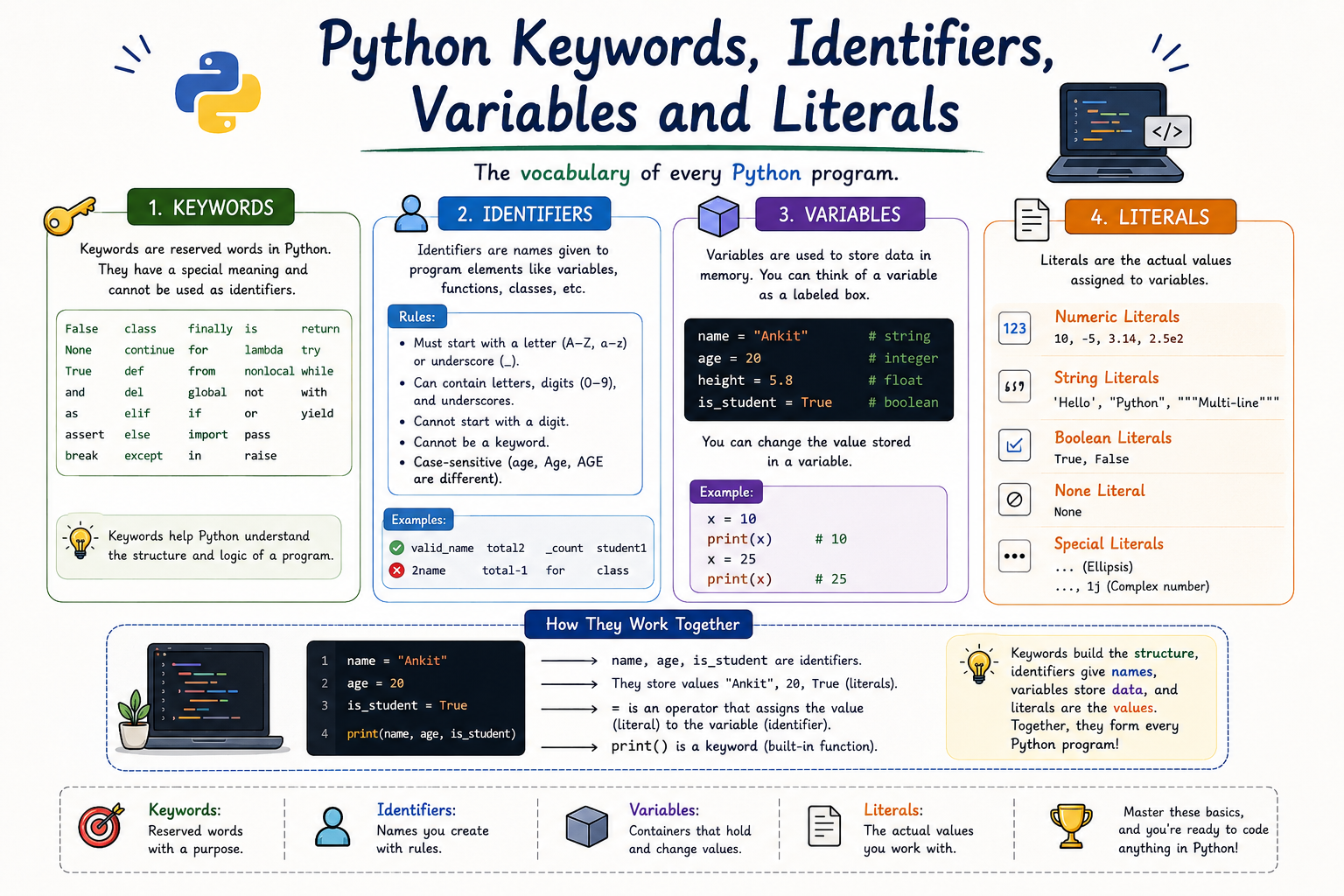
Table of Contents
Python Keywords
Keywords are reserved words in Python that have a special, predefined meaning to the interpreter. Because of this, they cannot be used as variable names, function names, or any other identifier.
Some Common Python Keywords
Tip
Python has 35 keywords (in Python 3). You can see the full list anytime by running
help("keywords") in the Python shell.
Identifiers
An identifier is the name given to entities like variables, functions, classes, or
modules in a program. For example, in age = 20, the word
age is an identifier.
Rules for Naming Identifiers
✅ Allowed
- Can contain letters, digits, and underscores.
- Must start with a letter or underscore, not a digit.
- Case-sensitive:
Ageandageare different.
❌ Not Allowed
- Cannot start with a digit, e.g.
1name. - Cannot contain spaces or special symbols like
@ # $ %. - Cannot be a Python keyword, e.g.
class.
Variables
A variable is a named location in memory used to store data that can change during the execution of a program. In Python, you don't need to declare the type of a variable — it is decided automatically based on the value assigned.
Tip
Python variables are references — think of them as labels pointing to a value stored in memory, rather than boxes holding the value directly.
Assigning Values to Variables
Python uses the = operator to assign a value to
a variable.
name = "Riya"
age = 20
height = 5.4

# Multiple assignment
x, y, z = 1, 2, 3
Literals
A literal is a raw, fixed value written directly in the source code, such as a number or a piece of text.
| Type of Literal | Example |
|---|---|
| Numeric Literal | 10, 3.14, 2+3j |
| String Literal | "Hello", 'Python' |
| Boolean Literal | True, False |
| Special Literal | None |
Code Example
name = "Aman"       # identifier: name, literal: "Aman"
age = 21              # identifier: age, literal: 21
is_student = True     # identifier: is_student, literal: True

print(name, age, is_student)
Output: Aman 21
True
Common Beginner Mistakes
- Using a Python keyword as a variable name, e.g.
class = "A". - Starting an identifier with a digit, e.g.
1st_name. - Forgetting that variable names are case-sensitive.
- Confusing a variable with the literal value it stores.
Quick Revision
| Concept | Key Point |
|---|---|
| Keyword | Reserved word with special meaning, e.g. if,
for.
|
| Identifier | Name given to a variable, function, or class. |
| Variable | Named container that stores a value. |
| Literal | Fixed value written directly in the code. |
Summary
Keywords are Python's reserved vocabulary, identifiers are the names you choose for your data and code, variables are the containers that hold changing values, and literals are the fixed values you write directly in your program. Together, they form the foundation of every Python statement you'll write.




