
Unit 2 · Dictionary Introduction and Basic Operations
Dictionary Introduction and Basic Operations
Learn Python's key-value association mapping type: creating dictionaries, accessing values by key, and basic operations.
Introduction
In Python, a Dictionary is one of the most powerful and commonly used built-in data structures. Unlike lists and tuples, which store elements in a sequential order and access them using numerical index positions, dictionaries store information in the form of key-value pairs. Each key acts as a unique identifier that is associated with a particular value.
A dictionary is known as a mapping data type because it maps one piece of information (the key) to another piece of information (the value). Instead of searching through an entire collection to find data, Python directly uses the key to retrieve its corresponding value, making dictionary operations extremely fast and efficient.
Dictionaries are widely used in real-world software development because most data naturally exists in key-value form. For example, a student's roll number maps to their name, an employee ID maps to employee information, a country's code maps to its name, or a username maps to a user's profile.
Unlike lists, dictionaries do not rely on the position of elements. The order of keys is not important when retrieving values because access is always performed using the corresponding key rather than an index.
Important Idea
A dictionary stores information in the form:
Every key uniquely identifies its associated value.
Real-Life Analogy
| Dictionary Concept | Real-Life Example |
|---|---|
| Student Roll Number | Student Name |
| Employee ID | Employee Details |
| Username | User Profile |
| Country Code | Country Name |
Exam Point
A dictionary is a mutable, unordered (conceptually), mapping data structure that stores information as key-value pairs. Keys must be unique and immutable, whereas values may be duplicated and can be of any data type.
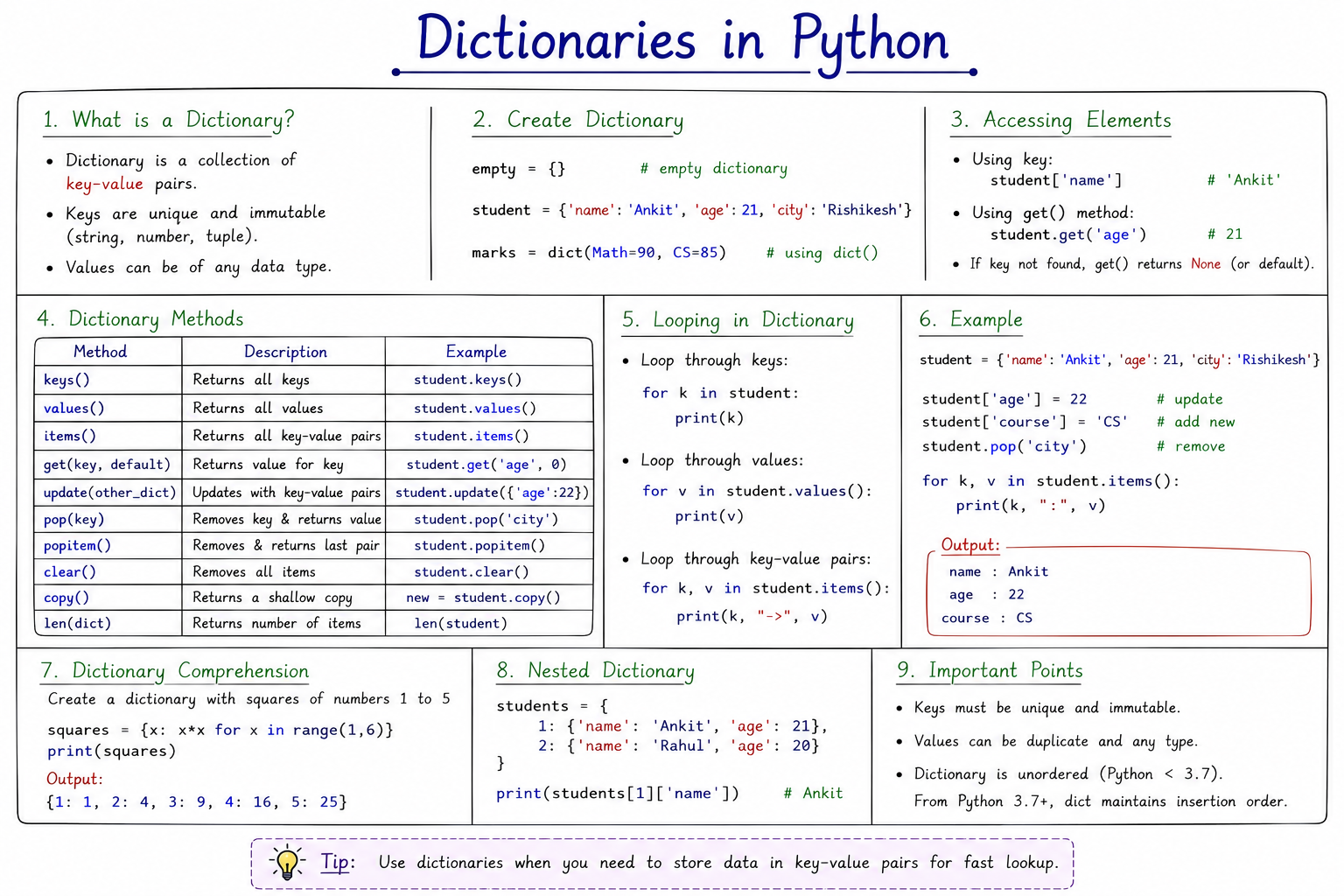
Table of Contents
Creating Dictionaries
Dictionaries are created using curly braces { }. Every element inside the dictionary consists
of a key followed by a colon (:) and its corresponding value.
Multiple key-value pairs are separated by commas.
The general syntax of a dictionary is:
dictionary_name = {
    key1 : value1,
    key2 : value2,
    key3 : value3
}
Each key should be unique because duplicate keys are not allowed. If the same key appears multiple times, Python keeps only the last assigned value.
Example 1: Creating a Dictionary
student = {
    "name": "John",
    "age": 21,
    "courses": [
        "Math",
        "CS"
    ]
}

print(student)
Output
Understanding the Example
- "name" is the key and "John" is its value.
- "age" stores an integer value.
- "courses" stores an entire list as its value.
- A dictionary can store different data types simultaneously.
Important Note
Dictionary values can be integers, floating-point numbers, strings, lists, tuples, sets, dictionaries, Boolean values, or even user-defined objects. Python places no restriction on the type of values stored.
Example 2: Different Types of Values
employee = {
    "name": "Alice",
    "age": 30,
    "salary": 50000,
    "married": False,
    "skills": ["Python", "SQL"],
    "address": {
        "city": "Delhi",
        "pin": 110001
    }
}

print(employee)
This example demonstrates that a dictionary can store values of different data types simultaneously, including another dictionary. Such dictionaries are known as nested dictionaries.
Common Mistakes
- Using
=instead of:between key and value. - Forgetting commas between key-value pairs.
- Repeating the same key multiple times.
- Using square brackets instead of curly braces.
Exam Tip
One of the most frequently asked questions in university examinations is:
"Write the syntax for creating a dictionary with a suitable example."
Always explain that dictionaries use curly braces, store data as key-value
pairs, and allow values of different data types.
Accessing and Modifying Key-Values
One of the biggest advantages of a dictionary is that values can be accessed directly using their corresponding keys. Unlike lists, where elements are accessed using numerical indexes, dictionaries use unique keys to retrieve values. This makes searching much faster because Python directly locates the required value instead of checking every element one by one.
To access a value, write the dictionary name followed by the key inside square brackets [].
Python searches for the key and returns its corresponding value.
Syntax for Accessing Values
dictionary_name[key]
Example 1: Accessing Values
student = {
    "name": "John",
    "age": 21,
    "city": "Delhi"
}

print(student["name"])
print(student["age"])
Output
21
Step-by-Step Execution
- Python searches for the key
"name". - It finds the value "John".
- The value is returned and printed.
- The same process is repeated for the key
"age".
Remember
Dictionary keys are case-sensitive. For example,
"Name" and "name" are considered two different keys.
Modifying Existing Values
Dictionaries are mutable, meaning their contents can be changed after creation. To update an existing value, assign a new value to an existing key.
student = {
    "name": "John",
    "age": 21
}

student["age"] = 22

print(student)
Output
Here, Python finds the key "age" and replaces its old value (21) with the new value (22). The
key itself remains unchanged.
Adding New Key-Value Pairs
If the specified key does not already exist in the dictionary, Python automatically creates a new key-value pair.
student = {
    "name": "John",
    "age": 21
}

student["city"] = "New York"

print(student)
Output
Since the key "city" was not present, Python created a new entry automatically.
Updating Multiple Values
student = {
    "name": "John",
    "age": 21,
    "city": "Delhi"
}

student["age"] = 22
student["city"] = "Mumbai"

print(student)
Accessing Nested Dictionaries
Dictionaries can contain other dictionaries as values. Such dictionaries are called nested dictionaries. To access a nested value, specify each key one after another.
student = {
    "name": "John",
    "address": {
        "city": "Delhi",
        "pin": 110001
    }
}

print(student["address"]["city"])
Accessing a Non-Existing Key
If you try to access a key that does not exist using square brackets, Python raises a KeyError.
student = {
    "name": "John"
}

print(student["age"])
Output
KeyError: 'age'
To avoid this error, Python provides the get() method, which safely returns a default value if
the key is missing. This method is discussed later in this chapter.
Difference Between Updating and Adding
| Operation | Result |
|---|---|
student["age"] = 22
|
Updates an existing value. |
student["city"] = "Delhi"
|
Creates a new key-value pair. |
Common Mistakes
- Using an incorrect key name.
- Forgetting that dictionary keys are case-sensitive.
- Trying to access a key that does not exist.
- Confusing dictionary keys with list indexes.
- Using parentheses instead of square brackets.
Exam Tip
University examinations frequently ask students to:
- Create a dictionary.
- Access values using keys.
- Modify an existing value.
- Add a new key-value pair.
- Explain the difference between updating and inserting.
Rules for Keys
A dictionary stores data in the form of key-value pairs. Since every value is identified using its key, Python follows certain rules while creating dictionary keys. Understanding these rules is important because many programming errors occur due to incorrect key usage.
A key acts as the unique identifier of its corresponding value. Therefore, every key must satisfy specific conditions so that Python can locate values quickly and efficiently.
Important Rules
- Every key must be unique.
- Keys must be immutable (cannot be changed after creation).
- Strings, integers, floating-point numbers, Boolean values and tuples can be used as keys.
- Lists, sets and dictionaries cannot be used as keys because they are mutable.
- Values can be duplicated, but keys cannot.
- Keys are case-sensitive.
Rule 1: Keys Must Be Unique
Every key in a dictionary must be unique. If the same key is written more than once, Python keeps only the last assigned value and automatically replaces the previous one.
student = {
    "name": "John",
    "name": "David"
}

print(student)
Since the key "name" appears twice, Python ignores the first value and stores only the last
one.
Rule 2: Keys Must Be Immutable
Immutable objects are objects whose values cannot change after creation. Python allows only immutable objects to be used as dictionary keys because their values remain constant throughout program execution.
Allowed Key Types
- String
- Integer
- Float
- Boolean
- Tuple (only if it contains immutable elements)
marks = {
    101: "Ankit",
    102: "Rahul",
    True: "Present"
}

print(marks)
Rule 3: Mutable Objects Cannot Be Keys
Lists, dictionaries and sets are mutable because their contents can change after creation. Therefore, Python does not allow them to be used as dictionary keys.
data = {
    [1,2,3] : "Numbers"
}
Output
TypeError: unhashable type: 'list'
Rule 4: Values Can Be Repeated
Unlike keys, values are not required to be unique. Multiple keys can store exactly the same value.
marks = {
    "Math": 95,
    "Physics": 95,
    "Chemistry": 95
}

print(marks)
Here, three different keys store the same value (95). This is perfectly valid.
Rule 5: Keys Are Case-Sensitive
Python treats uppercase and lowercase letters differently. Therefore, two keys differing only in case are considered completely different keys.
student = {
    "Name": "John",
    "name": "David"
}

print(student)
Memory Trick
Keys = Unique + Immutable
Values = Any data type + Can repeat
Exam Tip
The question "State the rules for dictionary keys" is one of the most frequently asked theory questions in Python examinations. Always mention:
- Keys must be unique.
- Keys must be immutable.
- Keys are case-sensitive.
- Values may be duplicated.
Common Dictionary Methods
Python provides several built-in methods that make working with dictionaries easier. These methods help programmers retrieve keys, values, complete key-value pairs, safely access missing data, update dictionaries, and perform many other useful operations.
Among these methods, the most commonly used in university examinations and practical programming are:
keys()values()items()get()
1. keys() Method
The keys() method returns a view object containing all the keys present in the dictionary. It
is useful when you need to iterate through every key.
info = {
    "brand": "Ford",
    "model": "Mustang",
    "year": 2024
}

print(info.keys())
Explanation
The method does not return values. It only returns every key stored inside the dictionary.
2. values() Method
The values() method returns all the values stored in a dictionary.
info = {
    "brand": "Ford",
    "model": "Mustang",
    "year": 2024
}

print(info.values())
3. items() Method
The items() method returns every key-value pair as a tuple inside a view object. It is commonly
used while traversing dictionaries using loops.
info = {
    "brand": "Ford",
    "model": "Mustang"
}

print(info.items())
4. get() Method
The get() method is used to safely retrieve the value associated with a key. Unlike square
bracket
notation ([]), it does not generate a KeyError if the key is missing. Instead, it
returns None or a default value specified by the programmer.
Syntax
dictionary.get(key)

dictionary.get(key, default_value)
Example
info = {
    "brand": "Ford",
    "model": "Mustang"
}

print(info.get("brand"))
print(info.get("year"))
print(info.get("year", 2024))
Output
None
2024
Why Use get()?
The get() method prevents programs from crashing when a key is absent. It is commonly used
while reading user data, configuration files, JSON data, APIs, and databases.
5. update() Method
The update() method inserts new key-value pairs or updates existing ones. If a key already
exists,
its value is replaced; otherwise, a new key is created.
student = {
    "name": "John",
    "age": 21
}

student.update({
    "age": 22,
    "city": "Delhi"
})

print(student)
6. pop() Method
The pop() method removes a specific key from the dictionary and returns its corresponding
value.
student = {
    "name": "John",
    "age": 21
}

age = student.pop("age")

print(age)
print(student)
{'name': 'John'}
7. popitem() Method
The popitem() method removes and returns the last inserted key-value pair from the dictionary.
student = {
    "name": "John",
    "age": 21,
    "city": "Delhi"
}

print(student.popitem())
print(student)
{'name': 'John', 'age': 21}
8. clear() Method
The clear() method removes all key-value pairs from a dictionary, leaving it empty.
student = {
    "name": "John",
    "age": 21
}

student.clear()

print(student)
9. copy() Method
The copy() method creates a shallow copy of a dictionary. The copied dictionary contains the
same
key-value pairs but is a separate object.
student = {
    "name": "John",
    "age": 21
}

new_student = student.copy()

print(new_student)
Most Important Dictionary Methods
| Method | Purpose |
|---|---|
keys() |
Returns all keys. |
values() |
Returns all values. |
items() |
Returns key-value pairs. |
get() |
Safely retrieves a value. |
update() |
Adds or updates data. |
pop() |
Removes a specific key. |
popitem() |
Removes the last inserted pair. |
clear() |
Removes all entries. |
copy() |
Creates a shallow copy. |
Summary
A dictionary is one of Python's most powerful and flexible data structures. It stores information as key-value pairs, making it possible to retrieve data quickly using unique keys instead of numerical indexes.
Dictionaries are mutable, meaning their contents can be modified after creation. You can add new key-value
pairs, update existing values, remove entries, or safely retrieve values using built-in methods such as
get().
Keys must always be unique and immutable, while values can be of any data type and may be repeated. Because of their fast lookup capability, dictionaries are widely used in real-world software such as databases, web applications, APIs, configuration files, and machine learning projects.
Key Takeaways
- Dictionary stores data as key-value pairs.
- Keys must be unique and immutable.
- Values can be duplicated and may be of any data type.
- Access values using their corresponding keys.
- Dictionaries are mutable and can be modified.
keys(),values(),items(), andget()are the most frequently used dictionary methods.update(),pop(),clear(), andcopy()simplify dictionary manipulation.
Exam Revision Points
- Define a dictionary with an example.
- Explain key-value pairs.
- Write the rules for dictionary keys.
- Differentiate between lists and dictionaries.
- Explain
keys(),values(),items(), andget(). - Write programs to create, access, update, and delete dictionary entries.




