
Unit 2 · String Formatting
String Formatting
Learn the three core techniques for formatting text and inserting variables into strings in Python.
Learning Objectives
By the end of this lesson, you will be able to:
- Explain why string formatting is necessary for creating dynamic text.
- Describe and use three methods: %-formatting, the `str.format()` method, and f-strings.
- Compare the advantages and disadvantages of each formatting technique.
- Choose the most appropriate formatting method for a given scenario.
- Format floating-point numbers to a specific number of decimal places.
Prerequisites
To fully understand this topic, you should be comfortable with:
- Basic Python strings.
- Variables and different data types (string, integer, float).
Introduction
In programming, we rarely work with static text. Most of the time, we need to create dynamic messages by embedding variable values into strings. For example, you might want to generate a message like "Hello, Alice, your score is 95."
This process of constructing strings by inserting variables is called **string formatting**. Python has evolved over the years, offering several ways to do this. We will cover the three main techniques:
- %-formatting: The old, C-style way.
- `str.format()` method: A more flexible method introduced in earlier versions of Python 3.
- F-strings (Formatted String Literals): The modern, fast, and most readable way, introduced in Python 3.6.
Why We Need String Formatting
String formatting is essential for creating user-friendly and informative output. Without it, you would have to manually concatenate strings and convert non-string variables, which is clumsy and error-prone.
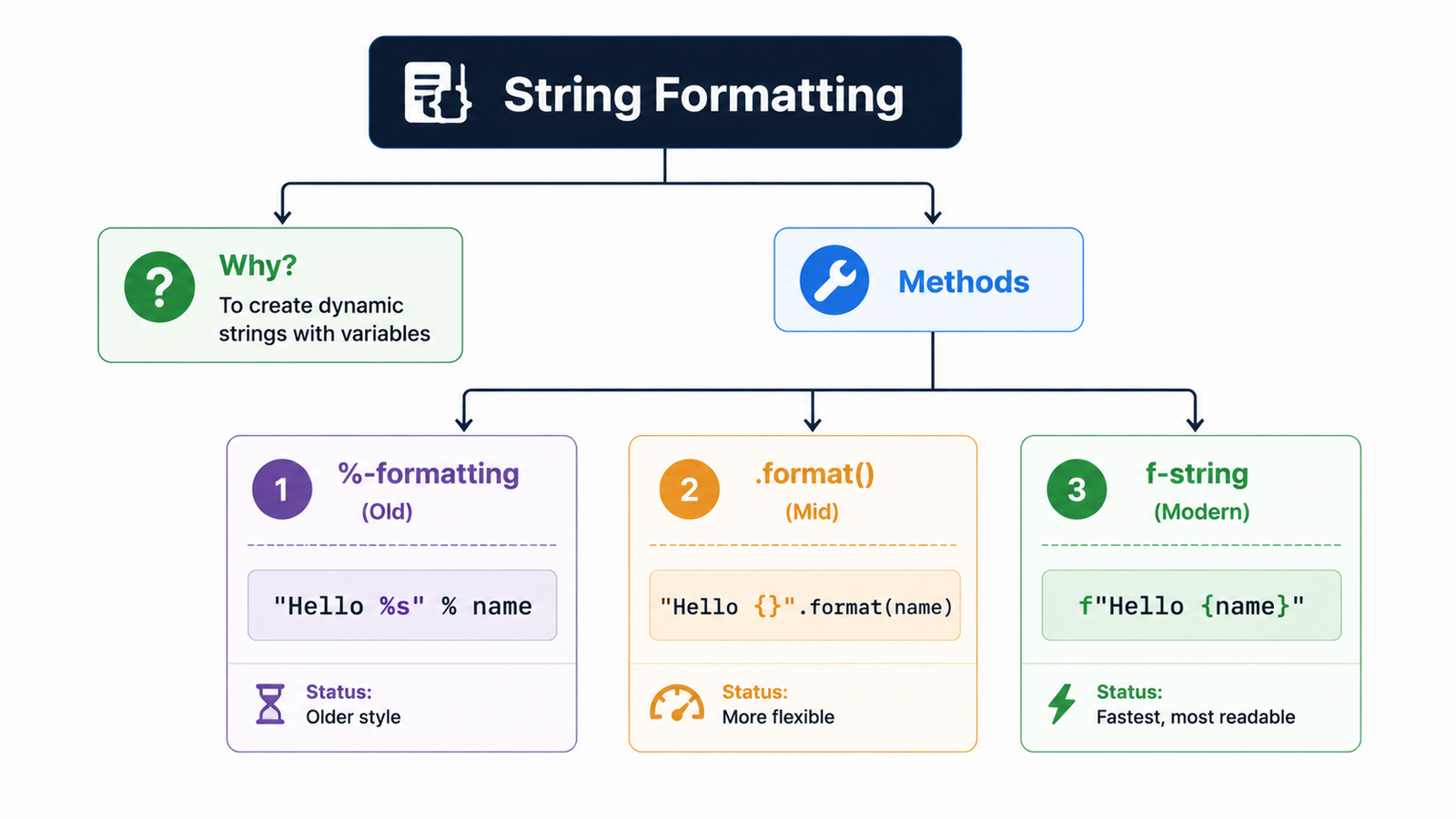
Table of Contents
1. %-Formatting (Old Style)
Derived from C's printf formatting, the % operator acts as a placeholder for
inserting values:
%s: Placeholder for strings.%d: Placeholder for integers.%f: Placeholder for floating-point numbers.
name = "Alice"
score = 95
message = "Student %s scored %d." % (name, score)
print(message)  # Student Alice scored 95.
2. `str.format()` Method
Introduced in Python 3, this method replaces curly braces {} placeholders with values passed as
arguments to the .format() method:
name = "Bob"
age = 22
message = "{} is {} years old.".format(name, age)
print(message)  # Bob is 22 years old.

# You can also use numbers inside braces to specify indices:
message_idx = "{1} is {0} years old.".format(age, name)
print(message_idx)  # Bob is 22 years old.
3. F-Strings (Modern & Preferred)
Introduced in Python 3.6, **f-strings** (formatted string literals) are the most readable, concise, and
fastest formatting method. Simply prefix the string with f or F, and you can write
variables or Python expressions directly inside curly braces:
name = "Charlie"
score = 88.5
message = f"Hello {name}, your score is {score}."
print(message)  # Hello Charlie, your score is 88.5.

# You can even evaluate code inside braces:
print(f"Next year, age is {20 + 1}")
Comparison of Formatting Methods
This comparison is a favorite in university vivas and technical interviews.
| Feature | %-formatting | `.format()` method | f-string |
|---|---|---|---|
| Syntax | `"..." % (vars)` | `"{}".format(vars)` | `f"{var}"` |
| Readability | Low (variables are separate) | Medium | High (variables are inline) |
| Performance | Slowest | Slower | Fastest |
| Expressions | No | No | Yes (`f"{2*5}"`) |
Formatting Float Precision
To round float values to a specific number of decimal places, use :.Nf inside the braces where
N is the number of decimals:
pi = 3.1415926535
print(f"Pi to 2 decimal places: {pi:.2f}")  # 3.14
print(f"Pi to 4 decimal places: {pi:.4f}")  # 3.1416
Exam Corner & Practice
Common Mistakes
- Forgetting the `f` prefix before an f-string, which results in the `{variable}` being printed literally.
- Using the wrong placeholder with %-formatting (e.g., `%d` for a string).
- Providing the wrong number of arguments to `.format()` or `%`.
Exam Notes
- **F-strings are the modern, preferred method** due to their speed and readability.
- Be prepared to explain the differences between the three formatting methods.
- The syntax for float formatting (`:.2f`) is a common question.
Interview Questions
- Which string formatting method is the fastest in Python and why? (Answer: F-strings, because they are evaluated at runtime and compiled into more efficient bytecode).
- How do you format a number to show only two decimal places? (Answer: `f"{number:.2f}"`).
- Can you evaluate expressions inside an f-string? Give an example. (Answer: Yes, `f"The sum is {5 + 3}"`).
Practice Corner
# Question 1: What is the output?
val = 10
print(f"The value is {val * 2}")
# Answer: The value is 20

# Question 2: Write a program that asks for a user's name and age
# and prints a welcome message using an f-string.
name = input("Enter your name: ")
age = input("Enter your age: ")
print(f"Welcome, {name}! You are {age} years old.")
Summary
Python provides three main ways to format strings: the old C-style **%-formatting**, the more flexible **`.format()` method**, and the modern, fast, and highly readable **f-strings**. F-strings are the current industry standard because they allow variables and expressions to be embedded directly within a string literal, making the code cleaner and more efficient.




