
Unit 2 · Nested Lists
Nested Lists
Learn how to represent and manipulate multi-dimensional data, such as matrices or grids, using nested lists in Python.
Learning Objectives
By the end of this lesson, you will be able to:
- Define and create a nested list to represent 2D data.
- Access individual elements and entire rows using chained indices.
- Modify elements within a nested list.
- Traverse a nested list using nested `for` loops to process all elements.
- Apply nested lists to solve problems involving matrices, grids, and tabular data.
Prerequisites
To fully grasp this topic, you should be comfortable with:
- Basic Python lists (creating, indexing, modifying).
- `for` loops and the concept of nested loops.
Introduction
A list can store any type of element, including other lists. A list containing other lists is known as a nested list. Nested lists are highly useful for representing multi-dimensional data models, such as grids, spreadsheets, or matrices.
Why We Need Nested Lists
Simple, one-dimensional lists are great for storing a sequence of items, like a list of names. However, many real-world problems involve data arranged in a grid or table with rows and columns. Nested lists provide a natural way to model this structure in Python.
Real-Life Examples
Matrices in Mathematics
A 2x2 matrix can be represented as `[[a, b], [c, d]]`, where each inner list is a row.
Game Boards
A tic-tac-toe board is a 3x3 grid, perfectly modeled by a nested list like `[['X', 'O', ''], ['X', '', 'O'], ['', '', '']]`.
Spreadsheets/Tables
A table of student data (Name, Roll, Marks) can be stored as a list of lists, where each inner list represents a student's record.
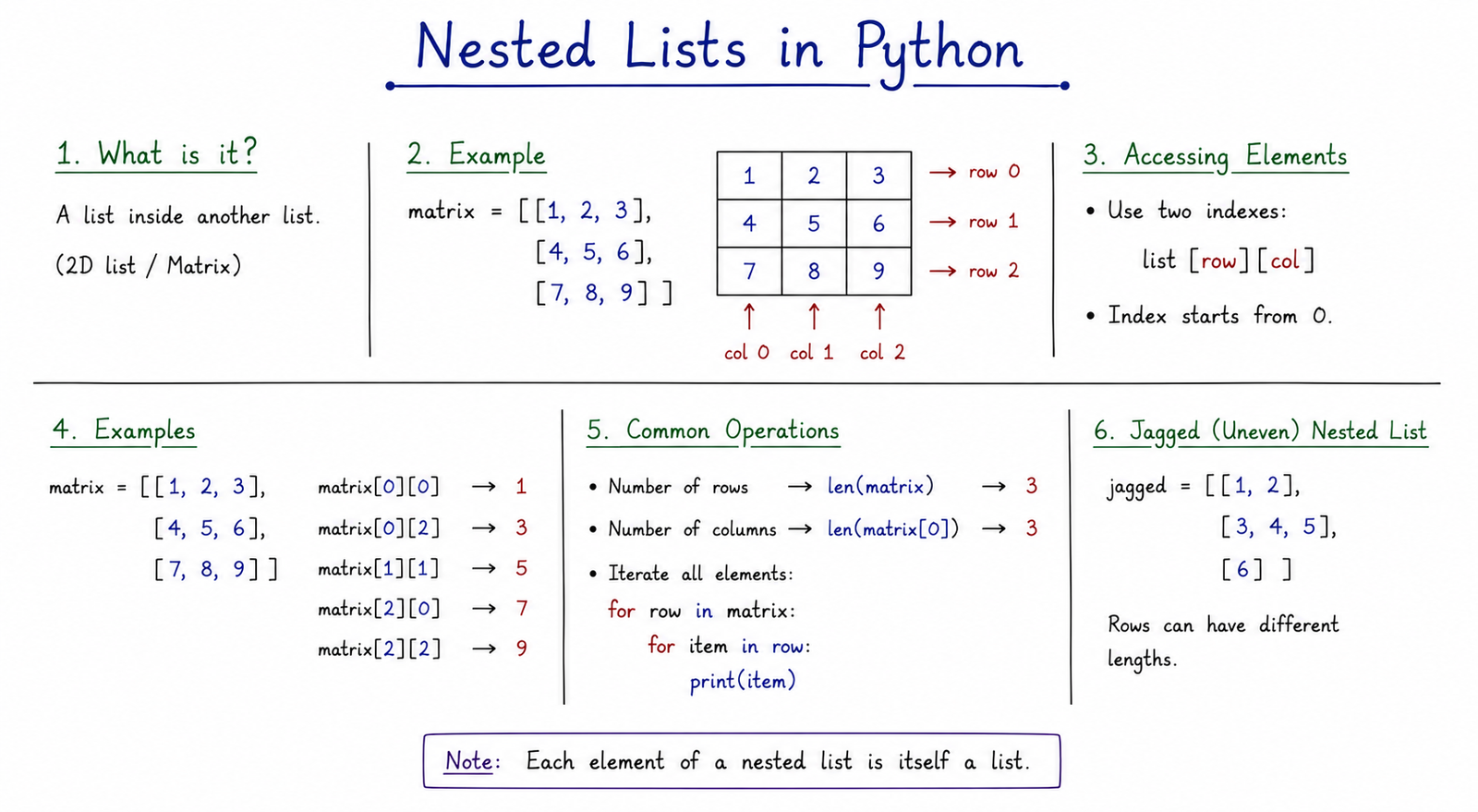
Table of Contents
Creating a Nested List
You can define a nested list by placing list expressions inside square brackets:
# A 3x3 matrix
matrix = [
    [1, 2, 3],
    [4, 5, 6],
    [7, 8, 9]
]
Accessing Nested Elements
To access elements in a nested list, you chain square brackets. The syntax is `list_name[row_index][column_index]`.
- The first index (`row_index`) selects the inner list (the row).
- The second index (`column_index`) selects the element from within that inner list (the column).
#         col 0  col 1  col 2
matrix = [
    [1, 2, 3],
    [4, 5, 6]
]
print(matrix[0])      # [1, 2, 3] (gets row 0)
print(matrix[1][2])   # 6 (gets row 1, column 2)
Important: `IndexError`
Trying to access a row or column that doesn't exist will raise an `IndexError`. For example, `matrix[2]` or `matrix[0][3]` would both cause an error in the example above.
Modifying Nested Elements
Since lists are mutable, you can modify any nested item by chaining index numbers:
matrix = [
    [1, 2],
    [3, 4]
]
matrix[0][1] = 99
print(matrix)       # [[1, 99], [3, 4]]
Traversing with Nested Loops
To traverse or print all elements in a multi-dimensional nested list, use nested for loops:
matrix = [
    [1, 2, 3],
    [4, 5, 6]
]

for row in matrix:
    for element in row:
        print(element, end=" ")
    print()  # Print newline after each row

# Output:
# 1 2 3
# 4 5 6
1D List vs. 2D Nested List
Understanding the difference is key for exams.
| Feature | Simple List (1D) | Nested List (2D) |
|---|---|---|
| Structure | A single, linear sequence of items. | A list where each item is another list (grid-like). |
| Accessing | `my_list[i]` (one index) | `my_list[row][col]` (two indices) |
| Traversal | Single `for` loop. | Nested `for` loops. |
| Use Case | Shopping list, list of names. | Matrix, tic-tac-toe board, spreadsheet data. |
Common Mistakes & Exam Points
Common Mistakes
- Using only one index to access an element (e.g., `matrix[0]`), which returns the whole row, not an element.
- Forgetting the inner loop when trying to process every single element.
- Getting an `IndexError` by trying to access a row or column that is out of bounds.
- Assuming all inner lists must have the same length (they can be "jagged" or irregular).
Exam Notes
- Nested lists are Python's primary way to implement 2D arrays or matrices.
- Accessing an element requires two indices: `[row][column]`.
- Traversing all elements requires two loops: an outer loop for rows and an inner loop for columns.
- Matrix problems (addition, multiplication, transpose) are classic applications of nested lists and are very common in exams.
Interview Questions
1. How do you represent a 3x3 matrix in Python?
Answer: Using a nested list, where three inner lists each contain three elements. For example: `[[1,2,3], [4,5,6], [7,8,9]]`.
2. What is the difference between `matrix[1]` and `matrix[1][1]`?
Answer: `matrix[1]` accesses the entire second row (which is a list). `matrix[1][1]` accesses the second element *within* the second row.
3. How would you get the number of rows and columns in a matrix `m`?
Answer: The number of rows is `len(m)`. The number of columns (assuming it's not a jagged array) is `len(m[0])`.
Practice Corner
Output Prediction Questions
# Question 1: What is the output?
matrix = [[10, 20], [30, 40]]
print(matrix[1][0])
# Answer: 30

# Question 2: What is the output?
total = 0
grid = [[1, 2], [3, 4]]
for row in grid:
    total += row[0]
print(total)
# Answer: 4 (1 + 3)
Practice Programs
- Write a program to find the sum of all elements in a matrix.
- Write a program to print the diagonal elements of a square matrix.
- Write a program to add two matrices of the same size.
Summary
A nested list is a list that contains other lists as its elements, making it the primary way to represent 2D data like matrices and grids in Python. Elements are accessed and modified using two chained indices: `list_name[row][column]`. To process every element in a nested list, a nested `for` loop structure is required, where the outer loop iterates through the rows and the inner loop iterates through the elements of each row.




