
Unit 2 · String Indexing and Slicing
String Indexing and Slicing
Learn how to access individual characters and extract substrings using Python's powerful indexing and slicing mechanisms.
Learning Objectives
By the end of this lesson, you will be able to:
- Access individual characters in a string using positive and negative indexing.
- Extract substrings using the slicing syntax `[start:stop:step]`.
- Understand the difference between inclusive `start` and exclusive `stop` parameters.
- Use slicing to reverse a string.
- Differentiate between indexing (which returns an element) and slicing (which returns a new string).
Prerequisites
To fully understand this topic, you should be comfortable with:
- Basic Python strings and how to create them.
- The concept of a sequence and ordered data.
Introduction
Since a string is an ordered sequence of characters, we can access specific parts of it. Python provides two ways to do this: Indexing (for accessing a single character) and Slicing (for extracting a sub-section of the string).
Why We Need Indexing and Slicing
In real-world programming, we often need to work with parts of a string, not the whole thing.
- Data Extraction: Getting a user's first name from their full name, or extracting a file extension from a filename (e.g., `.jpg` from `image.jpg`).
- Validation: Checking if a phone number starts with a specific country code.
- Manipulation: Reversing a string to check if it's a palindrome.
- Parsing: Breaking down a URL into its protocol, domain, and path.
Indexing and slicing give us the precision to target and manipulate these specific parts of text data efficiently.
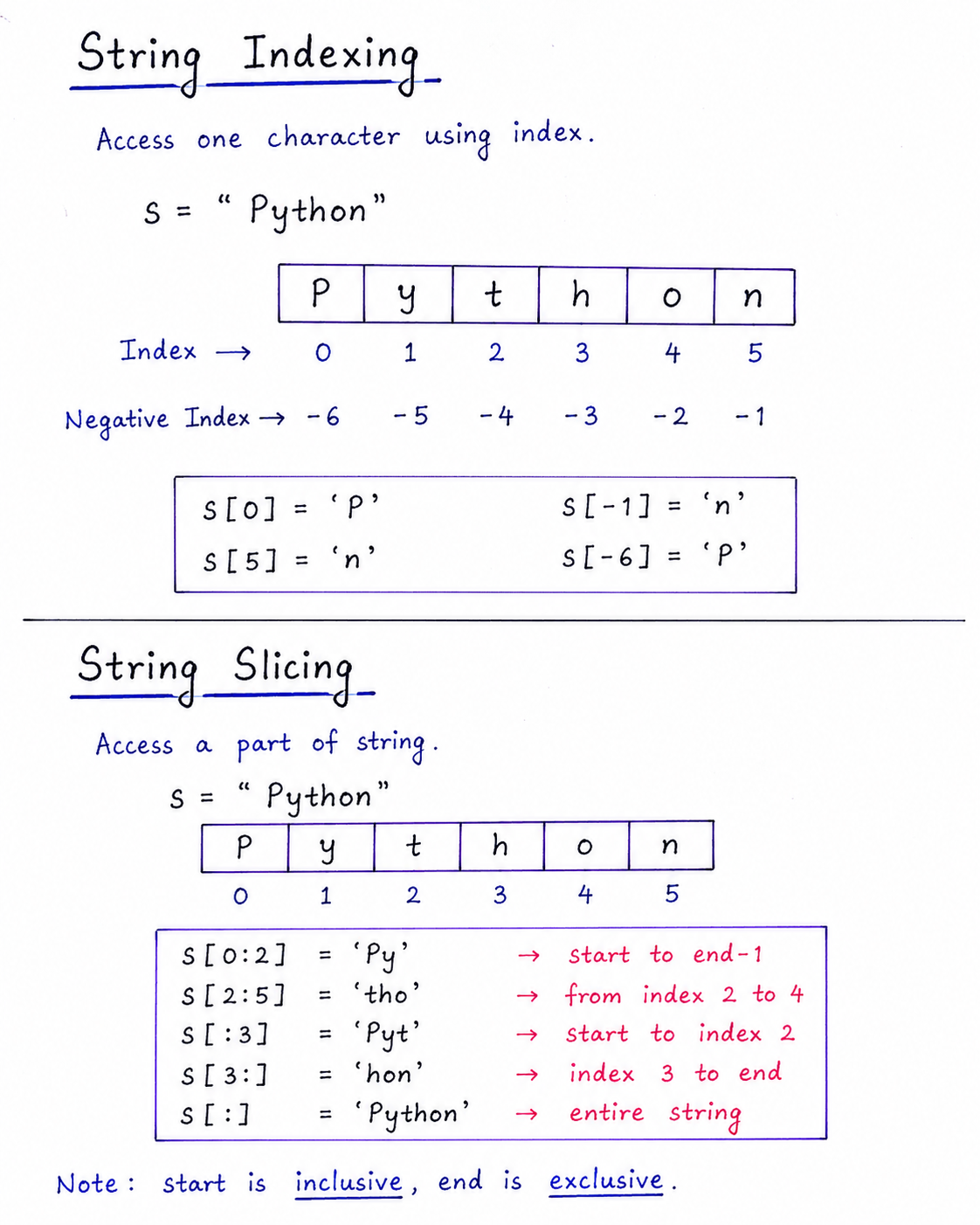
Table of Contents
String Indexing
Each character in a string has a corresponding index number:
- Positive Indexing: Starts from
0(left-most character) and increases by 1 to the right. - Negative Indexing: Starts from
-1(right-most character) and decreases by 1 going left.
word = "Python"
print(word[0])   # P (first character)
print(word[-1])  # n (last character)
print(word[-2])  # o (second to last character)
Important: `IndexError`
Trying to access an index that is outside the bounds of the string (e.g., `word[6]` in the example above) will raise an `IndexError`.
String Slicing Syntax
Slicing allows you to extract a subset of characters from a string using square brackets and colons:
string[start:stop:step]
How it works:
start: Index where the slice begins (inclusive). Defaults to 0.stop: Index where the slice ends (exclusive). Defaults to the end of the string.step: The step count or spacing between characters. Defaults to 1.
Exam Critical: The `stop` value is exclusive
Always remember that `word[0:4]` extracts characters at indices 0, 1, 2, and 3. The character at the `stop` index (4) is **never included**. This is a very common exam trap.
Worked Examples
word = "Computer"
print(word[0:4])   # Comp (indices 0, 1, 2, 3)
print(word[:3])    # Com (starts at 0 by default)
print(word[4:])    # uter (goes to end by default)
print(word[1:7:2])  # 'opt' (indices 1, 3, 5)

# Reversing a string (classic trick)
reversed_word = word[::-1]
print(reversed_word)  # 'retupmoC'
Indexing vs. Slicing (Key Difference)
This is a fundamental distinction that is often tested.
| Feature | Indexing (`word[i]`) | Slicing (`word[i:j]`) |
|---|---|---|
| Return Type | A single character (a string of length 1). | A new string (can be empty, or have one or more characters). |
| Error on Out of Bounds | Yes, raises `IndexError`. | No, fails gracefully (returns an empty string). |
Common Mistakes & Exam Points
Common Mistakes
- Forgetting that the `stop` index in slicing is exclusive.
- Trying to access an out-of-range index, which causes an `IndexError`.
- Confusing `word[0]` (a character) with `word[0:1]` (a one-character string).
- Assuming slicing modifies the original string (it doesn't, strings are immutable).
Exam Notes
- The slice `[::-1]` is the standard Python idiom for reversing a sequence.
- Slicing always returns a new string.
- Predicting the output of complex slices (e.g., with negative steps) is a very common exam question.
Practice Corner
Output Prediction Questions
# Question 1: What is the output?
s = "Programming"
print(s[1:5])
# Answer: "rogr"

# Question 2: What is the output?
s = "Python"
print(s[-3:])
# Answer: "hon"
Summary
Indexing accesses individual characters (using 0-based positive indexing or -1-based negative indexing).
Slicing allows extracting sub-strings using the [start:stop:step] syntax, which defaults to
left-to-right extraction unless step is set to negative.




