
Unit 2 · List Methods
List Methods
Learn the complete set of built-in Python list methods to add, remove, search, sort, and rearrange elements — all performed directly on the original list.
Introduction
One of the biggest advantages of a Python list is that it is mutable — its contents can be changed after creation. To make working with this mutability easy, Python provides a rich collection of built-in list methods that let you add new items, remove unwanted ones, search for values, and reorder elements — all without writing manual loops.
This is different from string methods. Since strings are immutable, string methods always return a new string. List methods, on the other hand, usually modify the list in-place — directly changing the original list object rather than creating a copy.
Easy Definition
List methods are built-in functions attached to a list object that let you modify the list's content directly — adding, removing, searching, or reordering elements.
Real-Life Example
- Adding a new item to a shopping cart →
append() - Removing a completed task from a to-do list →
remove() - Finding a student's rank in a marks list →
index() - Arranging exam scores from highest to lowest →
sort()
Examination Point of View
- Difference between
append()andextend()— very frequently asked. - Difference between
remove()andpop(). - Which methods return a value and which return
None. - Difference between
sort()(in-place) andsorted()(returns new list). - Tracing the final state of a list after a sequence of method calls.
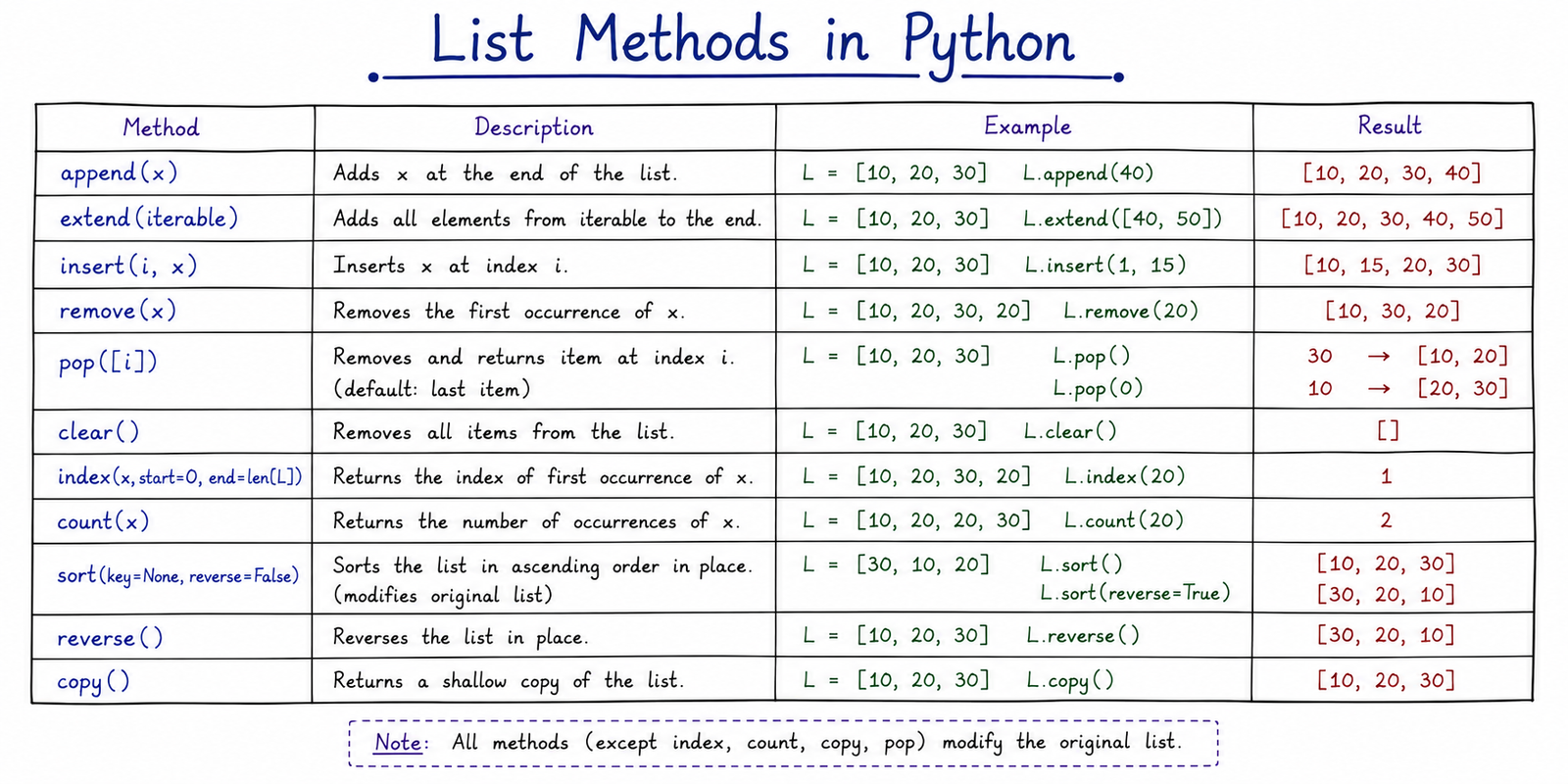
Table of Contents
Adding Elements
append(item): Adds a single item to the end of the list.extend(iterable): Appends every item from another iterable (list, tuple, etc.) to the end.insert(index, item): Inserts an item at a specific index, shifting later items right.
fruits = ["apple", "banana"]
fruits.append("orange")
print(fruits)          # ['apple', 'banana', 'orange']

fruits.insert(1, "mango")
print(fruits)          # ['apple', 'mango', 'banana', 'orange']

fruits.extend(["grapes", "pear"])
print(fruits)          # ['apple', 'mango', 'banana', 'orange', 'grapes', 'pear']
append() vs extend() — Very Important Distinction
append() adds its argument as a single element (even if that argument
is itself a list). extend() unpacks the iterable and adds each element
individually.
a = [1, 2]
a.append([3, 4])
print(a)     # [1, 2, [3, 4]]   ← nested list added as ONE item

b = [1, 2]
b.extend([3, 4])
print(b)     # [1, 2, 3, 4]     ← each item added separately
Removing Elements
pop(index): Removes and returns the item at the specified index. If index is not specified, it removes and returns the last item.remove(item): Searches for and removes the first occurrence of the specified value (not an index).clear(): Removes all items, leaving an empty list[].del list[index]: A Python keyword (not a method) that also deletes an item by index.
nums = [10, 20, 30, 40]
last = nums.pop()
print(last)            # 40
print(nums)            # [10, 20, 30]

nums.remove(20)
print(nums)            # [10, 30]
pop() vs remove() — Frequently Confused
| Feature | pop() | remove() |
|---|---|---|
| Works by | Index position | Value |
| Returns | The removed item | None |
| Error if invalid | IndexError |
ValueError |
Warning: remove() only
deletes the first matching value. If the value doesn't exist at all, Python raises
a ValueError.
Searching & Counting
index(item): Returns the index of the first occurrence of the item. RaisesValueErrorif the item is not found.count(item): Returns the number of times the item appears in the list.
vals = [5, 10, 5, 15, 5]
print(vals.count(5))  # 3
print(vals.index(10)) # 1
Real-Life Examples
| Situation | Method |
|---|---|
| Find a student's roll number position | roll_list.index(105) |
| Count how many times "Absent" appears | status.count("Absent") |
Sorting & Reversing
sort(): Sorts the list elements in ascending order, in-place. Setreverse=Truefor descending order.reverse(): Reverses the current order of elements in-place (not a sort — just flips the order).
scores = [85, 90, 75, 95]
scores.sort()
print(scores)          # [75, 85, 90, 95]

scores.sort(reverse=True)
print(scores)          # [95, 90, 85, 75]
Exam Point
reverse() does NOT sort the list — it simply flips the current order. Reversing an
unsorted list like [3, 1, 2] gives [2, 1, 3], not [3, 2, 1].
sort() vs sorted() — Very Important Distinction
Students frequently confuse the sort() method with the sorted() built-in
function. They behave very differently.
| Feature | list.sort() |
sorted(list) |
|---|---|---|
| Type | List method | Built-in function |
| Modifies original list? | Yes (in-place) | No — leaves it unchanged |
| Return value | None |
A brand-new sorted list |
| Works on | Lists only | Any iterable (list, tuple, string...) |
nums = [3, 1, 2]
result = nums.sort()
print(result)   # None  ← common trap in exams
print(nums)     # [1, 2, 3]

nums2 = [3, 1, 2]
new_list = sorted(nums2)
print(new_list) # [1, 2, 3]
print(nums2)    # [3, 1, 2]  ← original untouched
Common Mistakes
- Writing
my_list = my_list.sort()— this sets the list toNonebecausesort()returns nothing. - Confusing
append()(adds one item) withextend()(adds multiple items). - Calling
remove(item)with a value that doesn't exist, causing aValueError. - Assuming
reverse()sorts the list — it only flips existing order. - Forgetting that most list methods return
None, not the modified list.
Important Examination Points
- List methods generally modify the list in-place and return
None. append()adds one element;extend()adds multiple elements individually.pop()works by index and returns the removed value;remove()works by value and returns nothing.sort()changes the original list;sorted()returns a new list.index()raises an error if the value is absent;count()never raises an error (returns 0 instead).
Interview Questions
- What is the difference between
append()andextend()? - What is the difference between
remove()andpop()? - What is the difference between
sort()andsorted()? - What does
pop()return if called without an argument? - What error does
index()raise if the item is not found?
Practice MCQs
1. What is the output?
a = [1, 2]
a.append([3, 4])
print(a)
Answer: [1, 2, [3, 4]]
2. What is the output?
nums = [3, 1, 2]
print(nums.sort())
Answer: None
3. Which method removes an item by its value, not its index?
A) pop() B) del C) remove() D) clear()
Answer: C) remove()
4. What is the output?
vals = [5, 10, 5, 15, 5]
print(vals.count(5))
Answer: 3
Summary
Built-in list methods execute direct, in-place operations on a list: elements are added via
append(), insert(), or extend(); deleted via pop()
or remove(); searched via index() or count(); and reordered using
sort() and reverse(). Unlike string methods, most list methods return
None and change the original list directly rather than producing a copy.




