
Unit 2 · For Loop
For Loop
Learn definite loops in Python using the for loop to iterate over collections, lists, and other
sequences.
Introduction
A for loop is one of the most commonly used looping statements in Python. It is used to
execute a block of code repeatedly for every element present in a sequence or collection. Unlike a
while loop, which depends on a condition, a for loop is mainly used when the
number of iterations is already known or when every element of a collection needs to be processed.
The for loop is known as a definite loop because Python knows in advance how
many iterations will occur. It automatically moves from one element to the next until every item in the
sequence has been processed. After the last element is processed, the loop terminates automatically without
requiring any additional condition.
In Python, almost every iterable object can be used with a for loop. These iterable objects
include lists, tuples, strings, dictionaries, sets, and even sequences generated by the
range() function. During each iteration, the current element is assigned to a loop variable,
allowing the programmer to perform operations on that element.
The for loop is widely used in software development because it provides a simple and readable
way to traverse collections of data. Whether you are displaying student names, calculating the sum of
numbers, searching through records, processing files, or performing repetitive tasks, the for
loop is often the most suitable choice.
Compared to many other programming languages, Python's for loop is concise and easy to
understand. It eliminates the need to manually initialize and update loop variables in many situations,
making programs shorter, cleaner, and less prone to logical errors.
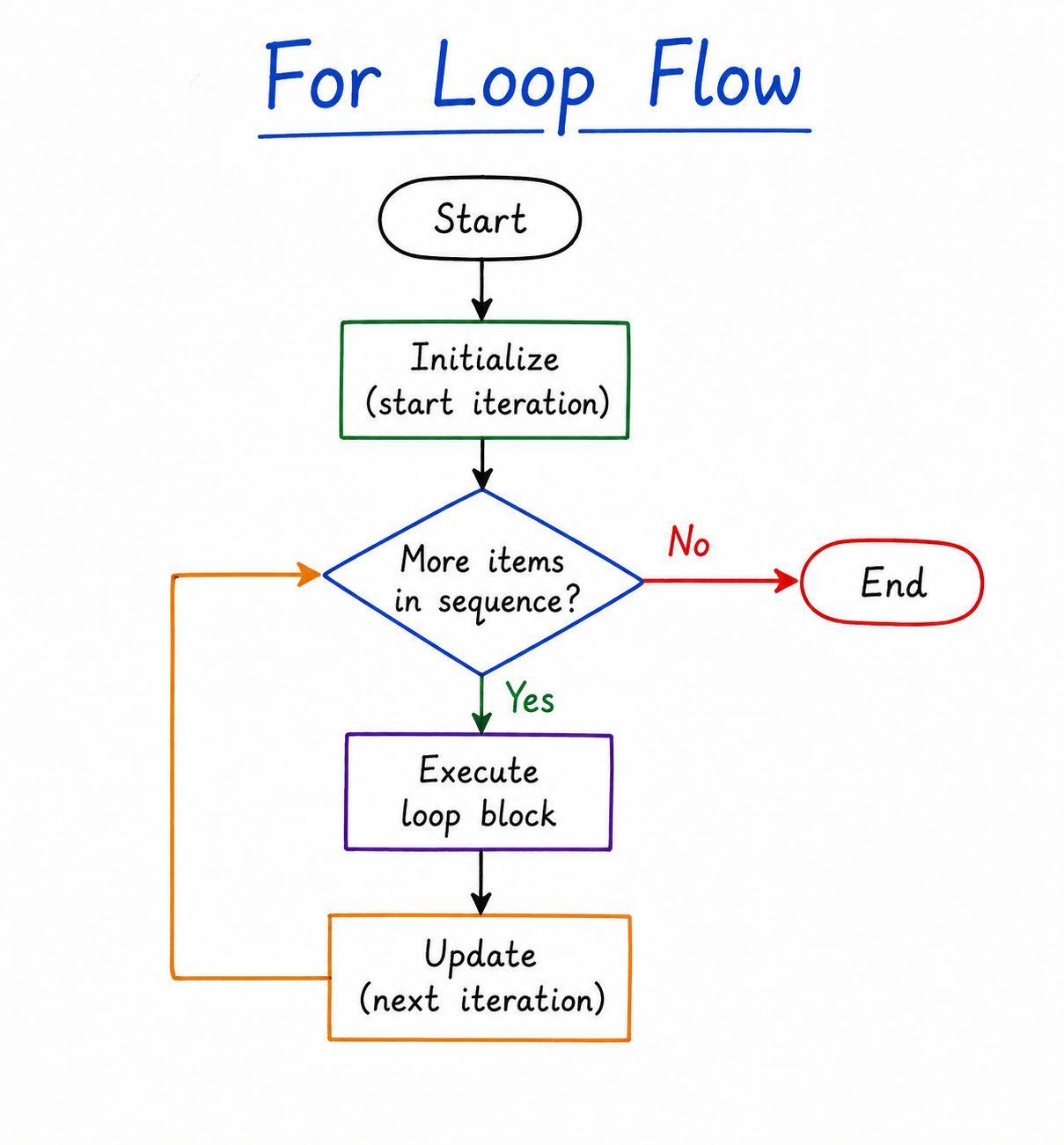
Table of Contents
Syntax of For Loop
The for loop in Python is used to iterate over the elements of a sequence or any iterable object. During each iteration, Python automatically assigns the current element of the sequence to the loop variable and executes the statements inside the loop body. Once all elements have been processed, the loop terminates automatically.
Unlike many other programming languages, Python does not require separate initialization, condition
checking, and update expressions. The for loop automatically handles the iteration process,
making programs simpler and easier to read.
General Syntax
for item in sequence:
    # statements to be executed
    statements
Understanding the Syntax
| Part | Description |
|---|---|
for
|
Keyword used to start the loop. |
item
|
Loop variable that stores one element at a time. |
in
|
Keyword that connects the loop variable with the iterable object. |
sequence
|
Any iterable object such as a list, tuple, string, set, dictionary, or range. |
statements
|
Block of code executed once for every element. |
Flow of Execution
- Python reads the first element of the sequence.
- The first element is assigned to the loop variable.
- The statements inside the loop are executed.
- Python automatically moves to the next element.
- The same process repeats until all elements have been processed.
- After the last element, the loop terminates automatically.
Example
fruits = ["Apple", "Mango", "Orange"]

for fruit in fruits:
    print(fruit)
Output
Mango
Orange
Dry Run of the Program
| Iteration | Value of fruit |
Output |
|---|---|---|
| 1 | Apple | Apple |
| 2 | Mango | Mango |
| 3 | Orange | Orange |
Remember
The loop variable does not store the entire sequence. It stores only one element at a time during each iteration. After the loop finishes, it contains the last processed element.
Common Mistakes
- Forgetting the colon (
:) after theforstatement. - Incorrect indentation inside the loop.
- Using a non-iterable object as the sequence.
- Confusing the loop variable with the complete collection.
Exam Tip
For theory questions, always write:
- Definition of the
forloop. - General syntax.
- Explanation of each syntax component.
- One suitable example with output.
- A short explanation of how the loop executes.
Iterating Over Sequences
One of the greatest advantages of Python's for loop is its ability to iterate over different
types of sequences. A sequence is a collection of elements arranged in a specific order. Examples of
sequences include lists, tuples, strings, and objects
generated by the range() function.
During each iteration, the for loop automatically picks the next element from the sequence and
stores it in the loop variable. The statements inside the loop are then executed using that value. Once
every element has been processed, the loop terminates automatically.
Remember
A for loop never needs a manual increment statement like
i = i + 1. Python automatically moves to the next element
after every iteration.
1. Iterating Over a List
A list is one of the most commonly used sequence types in Python. When a
for loop is used with a list, Python visits every element one by one,
starting from the first element and ending with the last element.
fruits = [
    "apple",
    "banana",
    "cherry"
]

for fruit in fruits:
    print("I like", fruit)
Output
I like banana
I like cherry
Dry Run
| Iteration | fruit | Output |
|---|---|---|
| 1 | apple | I like apple |
| 2 | banana | I like banana |
| 3 | cherry | I like cherry |
Since the list contains three elements, the loop executes exactly three
times. Each time, the variable fruit stores one element of the list.
Real-Life Analogy
Imagine a teacher calling students one by one from the attendance list.
Every student gets called exactly once. This is how a
for loop processes a list.
2. Iterating Over a Tuple
Tuples are ordered collections similar to lists, but they are immutable,
meaning their values cannot be modified after creation. A
for loop can iterate over tuples in exactly the same way as lists.
colors = (
    "Red",
    "Green",
    "Blue"
)

for color in colors:
    print(color)
Output
Green
Blue
Python automatically visits every tuple element from left to right until all values have been processed.
3. Iterating Over a String
A string is simply a sequence of characters. Therefore, the
for loop processes one character during each iteration.
word = "Python"

for char in word:
    print(char)
Output
y
t
h
o
n
Dry Run
| Iteration | char | Printed |
|---|---|---|
| 1 | P | P |
| 2 | y | y |
| 3 | t | t |
| 4 | h | h |
| 5 | o | o |
| 6 | n | n |
Common Mistakes
- Trying to modify the sequence while iterating over it.
- Using incorrect indentation inside the loop.
- Expecting the loop variable to contain all elements instead of only the current element.
- Confusing the loop variable with the original list or string.
Exam Tip
Questions asking you to print every element of a list, every character of a string, or every item in a tuple are almost always solved using a for loop.
4. Iterating Over a Dictionary
A dictionary stores data in the form of key-value pairs.
When a dictionary is directly used in a for loop, Python
iterates over its keys by default.
student = {
    "name": "John",
    "age": 21,
    "city": "Delhi"
}

for key in student:
    print(key)
Output
age
city
Notice that only the dictionary keys are printed because a dictionary automatically iterates over its keys.
Accessing Both Keys and Values
To print both keys and values together, use the
items() method.
student = {
    "name": "John",
    "age": 21,
    "city": "Delhi"
}

for key, value in student.items():
    print(key, ":", value)
age : 21
city : Delhi
Exam Note
When a dictionary is used directly inside a for loop,
Python iterates through the keys. To access both keys
and values simultaneously, use the
items() method.
5. Iterating Over a Set
A set is an unordered collection of unique elements. A
for loop can iterate over every element of a set.
Since sets are unordered, the output order may differ every time the
program is executed.
colors = {
    "Red",
    "Green",
    "Blue"
}

for color in colors:
    print(color)
Important
The order of output may change because sets do not preserve the order of elements.
6. Using enumerate()
Sometimes we need both the index and the
value while traversing a sequence.
Python provides the enumerate() function for this purpose.
fruits = [
    "Apple",
    "Banana",
    "Mango"
]

for index, fruit in enumerate(fruits):
    print(index, fruit)
Output
1 Banana
2 Mango
By default, indexing begins from 0. You can also specify
another starting value using
enumerate(sequence, start).
for index, fruit in enumerate(fruits, start=1):
    print(index, fruit)
2 Banana
3 Mango
7. Using zip()
The zip() function combines two or more sequences into a
single sequence. It is useful when multiple collections need to be
processed simultaneously.
names = [
    "John",
    "Alice",
    "Bob"
]

marks = [
    90,
    85,
    95
]

for name, mark in zip(names, marks):
    print(name, ":", mark)
Output
Alice : 85
Bob : 95
The zip() function stops when the shortest sequence ends.
Sequence Comparison
| Sequence | Loop Visits | Order Preserved |
|---|---|---|
| List | Elements | Yes |
| Tuple | Elements | Yes |
| String | Characters | Yes |
| Dictionary | Keys (default) | Yes |
| Set | Elements | No |
Common Mistakes
- Assuming dictionaries return values by default (they return keys).
- Expecting sets to produce elements in sorted order.
- Using
zip()with sequences of unequal length without understanding that iteration stops at the shortest sequence. - Confusing
enumerate()withrange().
Exam Tip
In university examinations, you should know how a
for loop works with lists,
tuples, strings,
dictionaries, and sets.
Questions on dictionary traversal using
items() and list traversal using
enumerate() are especially common in practical exams.
Nested For Loops
A nested for loop is a loop placed inside another
for loop. The outer loop executes first, and for every
iteration of the outer loop, the inner loop executes completely.
Nested loops are useful whenever a problem involves two dimensions or repeated combinations. They are commonly used for pattern printing, multiplication tables, matrix operations, coordinate generation, searching in two-dimensional data, and processing rows and columns.
Think of It Like This
Imagine a classroom with several rows. The teacher first selects a row (outer loop) and then calls every student in that row one by one (inner loop). After finishing one row, the teacher moves to the next row.
General Syntax
for outer_variable in outer_sequence:

    for inner_variable in inner_sequence:

        statements
The inner loop always completes all of its iterations before the outer loop proceeds to its next iteration.
Example 1: Basic Nested Loop
for i in [1, 2]:

    for j in ['A', 'B']:

        print(i, j)
Output
1 B
2 A
2 B
Dry Run
| Outer Loop (i) | Inner Loop (j) | Output |
|---|---|---|
| 1 | A | 1 A |
| 1 | B | 1 B |
| 2 | A | 2 A |
| 2 | B | 2 B |
Observe that for every value of i, the inner loop runs
completely before the next value of i is processed.
Example 2: Multiplication Table
Nested loops are frequently used to generate multiplication tables.
for i in range(1, 4):

    for j in range(1, 6):

        print(i * j, end=" ")

    print()
Output
2 4 6 8 10
3 6 9 12 15
Example 3: Printing a Square Pattern
Pattern-printing problems are among the most common applications of nested loops in programming and university examinations.
for i in range(4):

    for j in range(4):

        print("*", end=" ")

    print()
Output
* * * *
* * * *
* * * *
Example 4: Traversing a Matrix
A matrix is a two-dimensional collection. Nested loops make it easy to process every row and every column.
matrix = [

    [1, 2, 3],

    [4, 5, 6],

    [7, 8, 9]

]

for row in matrix:

    for value in row:

        print(value, end=" ")

    print()
4 5 6
7 8 9
Time Complexity
If the outer loop executes n times and the inner loop also executes n times, the total number of iterations is approximately n × n, written as O(n²).
Example
- 10 × 10 = 100 iterations
- 100 × 100 = 10,000 iterations
- 1000 × 1000 = 1,000,000 iterations
Therefore, unnecessary nested loops should be avoided when a simpler solution exists.
Common Mistakes
- Incorrect indentation of the inner loop.
- Forgetting to print a new line after completing one row.
- Confusing the outer and inner loop variables.
- Using nested loops when a single loop is sufficient.
- Writing incorrect ranges that produce extra rows or columns.
Exam Tip
Nested for loops are frequently asked in practical
examinations for printing patterns, multiplication tables,
traversing matrices, and generating combinations. Be comfortable
tracing the execution of both the outer and inner loops.
Code Examples
The best way to understand the for loop is by solving
practical problems. The following examples demonstrate how the loop can
be used to process sequences, perform calculations, count elements, and
solve common programming tasks frequently asked in university practical
examinations.
Example 1: Calculating the Sum of Numbers in a List
This program adds every number stored inside a list using a
for loop.
numbers = [4, 8, 2, 10, 5]

total = 0

for num in numbers:
    total += num

print("Total Sum =", total)
Output
Dry Run
| Iteration | num | total |
|---|---|---|
| 1 | 4 | 4 |
| 2 | 8 | 12 |
| 3 | 2 | 14 |
| 4 | 10 | 24 |
| 5 | 5 | 29 |
Example 2: Finding the Largest Number
This program finds the maximum value stored inside a list without using
Python's built-in max() function.
numbers = [18, 42, 9, 67, 31]

largest = numbers[0]

for num in numbers:

    if num > largest:
        largest = num

print("Largest =", largest)
Initially, the first element is assumed to be the largest. During every iteration, Python compares the current number with the current largest value and updates it whenever a larger number is found.
Example 3: Finding the Smallest Number
numbers = [18, 42, 9, 67, 31]

smallest = numbers[0]

for num in numbers:

    if num < smallest:
        smallest = num

print("Smallest =", smallest)
Example 4: Counting Vowels in a String
The following program counts the total number of vowels present in a string.
word = "Programming"

count = 0

for ch in word:

    if ch.lower() in "aeiou":
        count += 1

print("Total Vowels =", count)
Example 5: Counting Even and Odd Numbers
numbers = [4, 7, 12, 15, 18, 9]

even = 0
odd = 0

for num in numbers:

    if num % 2 == 0:
        even += 1
    else:
        odd += 1

print("Even =", even)
print("Odd =", odd)
Odd = 3
Example 6: Counting Characters
text = "Python"

count = 0

for ch in text:

    count += 1

print("Characters =", count)
Common Mistakes
- Initializing variables inside the loop instead of before it.
- Using incorrect indentation.
- Comparing the wrong variables.
- Forgetting to update counters.
- Using assignment (=) instead of comparison (==).
Exam Tip
Programs for finding the largest number, smallest number, sum of elements, counting vowels, counting even/odd numbers, and traversing strings or lists are among the most frequently asked Python practical questions in university examinations.
Summary
The for loop is one of Python's most important control
structures. It is used for definite iteration, which
means the loop executes once for every element present in a sequence.
Unlike a while loop, a for loop automatically
moves to the next element and terminates when the sequence ends.
Python's for loop can iterate over different sequence types
such as lists, tuples, strings, dictionaries, sets, and objects created
using the range() function. It is also commonly used for
solving practical programming problems such as calculating sums,
searching for maximum or minimum values, counting characters, traversing
matrices, and printing patterns.
Nested for loops further extend the capability of iteration
by allowing programmers to work with two-dimensional data structures and
complex repetitive tasks.
Key Takeaways
- The
forloop is used for definite iteration. - It automatically processes each element of a sequence.
- No manual increment statement is required.
- Works with lists, tuples, strings, dictionaries, sets, and
range(). - Nested loops are useful for matrices and pattern printing.
- The loop stops automatically after the last element.
Quick Revision Table
| Concept | Remember |
|---|---|
| Purpose | Definite iteration |
| Keyword |
for
|
| Iterates Over | Sequences |
| Increment Required | No |
| Stops Automatically | Yes |
| Nested Loops | Pattern printing, matrices |
Memory Trick
Remember the word FOR:
- F → Fixed number of iterations
- O → Over a sequence
- R → Repeats automatically
University Exam Questions
- Define a
forloop with syntax. - Differentiate between
forandwhileloops. - Write a program to calculate the sum of list elements.
- Write a program to print each character of a string.
- Explain nested
forloops with an example. - Write a program to print a multiplication table using nested loops.
- Explain iteration over lists, tuples, and dictionaries.
Interview Questions
- How does a
forloop work internally? - Why is a
forloop considered a definite loop? - Can a dictionary be iterated using a
forloop? - What is the difference between
range()and a list? - When should nested loops be avoided?
- What is the time complexity of nested loops?
Practice Programs
Beginner
- Print numbers from 1 to 20.
- Print all elements of a list.
- Print every character of a string.
- Calculate the sum of a list.
Intermediate
- Find the largest element in a list.
- Count vowels in a string.
- Print a multiplication table.
- Traverse a dictionary using
items().
Advanced
- Print different star patterns.
- Traverse a matrix.
- Create Pascal's Triangle.
- Generate coordinate pairs using nested loops.
Final Exam Tips
- Always remember the syntax of the
forloop. - Practice tracing loop execution using dry runs.
- Understand the difference between definite and indefinite loops.
- Be comfortable writing programs involving lists, strings, and nested loops.
- Pattern-printing questions are among the most common practical exam questions.




