
Unit 2 · Boolean Flag
Boolean Flag
Learn how to use boolean flag variables to manage program state and control loops cleanly.
Introduction
Definition
A Boolean Flag is a Boolean variable that stores either
True or False. It acts as a status indicator
that helps a program determine whether a particular condition,
event, or operation has occurred during program execution.
Detailed Explanation
During the execution of a program, it is often necessary to remember whether a specific task has been completed or whether a certain condition has become true. Instead of repeatedly checking the same condition, programmers use a Boolean flag to store the result.
A Boolean flag usually starts with an initial value of
False. Whenever the required condition is satisfied,
the flag is changed to True. Later in the program,
the stored value is checked to make further decisions.
Boolean flags simplify program logic by separating condition checking from decision making. They improve readability, reduce repeated calculations, and make programs easier to understand and maintain.
In Python, Boolean flags are commonly used in searching algorithms, loops, conditional statements, validation processes, menu-driven programs, user authentication systems, and many other applications.
Important Characteristics
- Stores only Boolean values (
TrueorFalse). - Represents the current state of a condition.
- Controls the execution flow of a program.
- Can change its value during program execution.
- Improves program readability.
- Makes decision-making easier.
- Reduces unnecessary condition checking.
- Commonly used with loops and conditional statements.
How a Boolean Flag Works
- Create a Boolean variable.
- Assign an initial value (
FalseorTrue). - Execute the program logic.
- Update the flag whenever the required condition occurs.
- Check the flag later to make decisions.
General Syntax
flag_name = False

# Program Logic

if condition:
    flag_name = True

# Decision

if flag_name:
    print("Condition satisfied")
else:
    print("Condition not satisfied")
Step-by-Step Working
- A Boolean variable is created.
-
The variable is initialized with either
TrueorFalse. - The program executes normally.
- Whenever the desired condition becomes true, the Boolean flag is updated.
- The updated flag is checked to determine the next action of the program.
Examination Notes
- A Boolean flag is an application of the
booldata type. - It stores only True or False.
- It is mainly used for controlling program flow.
- Boolean flags are frequently used inside loops.
- Searching algorithms commonly use Boolean flags.
- Boolean flags improve code readability.
- This topic is frequently asked in university practical examinations.
Common Mistakes
- Using integer values instead of Boolean values.
- Choosing meaningless variable names.
- Forgetting to update the flag after a condition becomes true.
- Resetting the flag accidentally inside a loop.
- Confusing Boolean flags with counters.
Interview Questions
- What is a Boolean flag?
- Why are Boolean flags used in programming?
- What values can a Boolean flag store?
- How is a Boolean flag different from a normal variable?
- Where are Boolean flags commonly used?
Competitive Exam Points
- Boolean Flag is based on the Boolean (
bool) data type. - Possible values are only
TrueandFalse. - Used in searching, loops, validation, and decision-making.
- Improves readability and maintainability of programs.
- One of the most common Boolean programming techniques.
Practice Questions
- Define a Boolean Flag.
- State any four characteristics of a Boolean Flag.
- Explain the working of a Boolean Flag.
- Write the general syntax of a Boolean Flag.
- Differentiate between a Boolean variable and a Boolean Flag.
Key Takeaways
- A Boolean Flag stores only True or False.
- It represents the status of a condition.
- It helps control program execution.
- It improves code readability.
- It is commonly used with loops, searching, and decision-making statements.
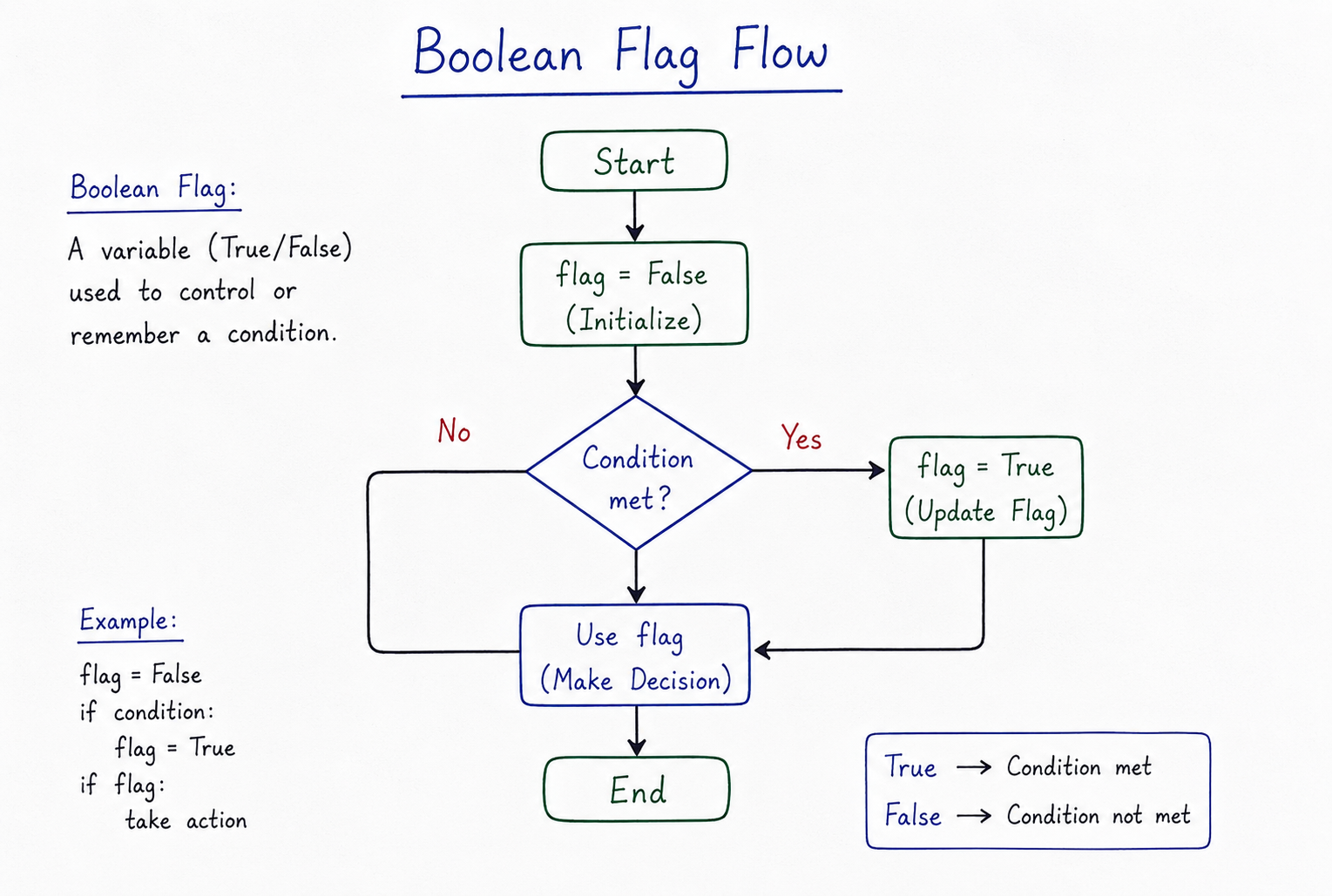
Table of Contents
What is a Boolean Flag?
A flag is simply a variable name you choose (like is_found, has_errors, or
is_running) that holds a Boolean value.
- You start by setting the flag to a default state (e.g.,
is_found = False). - During program execution, if the condition or item is found, you flip the flag:
is_found = True. - At the end of your loop or logic block, you inspect the flag to make final decisions.
Why Use Flags?
Flags help write clean, readable code. Instead of nesting multiple loops or writing complicated combined conditional checks, you can store intermediate search results inside a single state variable.
Design Best Practice
Name your flag variables using descriptive prefixes like is_, has_, or
should_. This makes the code self-documenting and reads naturally (e.g.,
if has_permission:).
Code Examples
Example 1: Checking if a list contains any even number
numbers = [1, 3, 5, 8, 9]
has_even = False  # Boolean Flag initialized to False

for num in numbers:
    if num % 2 == 0:
        has_even = True  # Flip the flag
        break            # Stop searching early

if has_even:
    print("The list contains at least one even number.")
else:
    print("The list contains only odd numbers.")
Example 2: A simple interactive program loop controlled by a flag
is_active = True

while is_active:
    command = input("Enter a command (type 'quit' to exit): ")
    if command == "quit":
        is_active = False  # Flipping the flag stops the loop
    else:
        print("Executing:", command)
Summary
A Boolean Flag is a state variable designed to carry status signals throughout program execution. By checking and updating flags inside control structures, you can build clean, readable, and highly maintainable decision logic.




