
Unit 2 · Loop Control Statements
Loop Control Statements (break, continue, pass)
Learn how to alter the natural execution flow of loops using Python's loop control statements:
break, continue, and pass.
Learning Objectives
By the end of this lesson, you will be able to:
- Define and explain the purpose of
break,continue, andpass. - Use the
breakstatement to terminate a loop prematurely. - Use the
continuestatement to skip the current iteration of a loop. - Understand the role of the
passstatement as a placeholder. - Differentiate between the behavior of
breakandcontinue. - Predict the output of loops that contain control statements.
Prerequisites
To get the most out of this topic, you should have a basic understanding of:
- Python's loop structures:
forandwhileloops. - Conditional logic using
ifstatements.
Introduction
Normally, loops execute their block of code repeatedly until their condition evaluates to false or all items in a sequence are exhausted. However, we sometimes need to alter this standard flow. Python provides three special statements to control the execution of loops: break, continue, and pass.
Why We Need Loop Control Statements
Loop control statements give us fine-grained control over our loops, making our code more efficient and readable.
- Efficiency: Why continue searching a list of a million items if you've already found
what you were looking for? The
breakstatement lets you stop early, saving valuable processing time. - Error/Data Handling: Sometimes, you encounter invalid or irrelevant data in a sequence.
The
continuestatement allows you to skip processing that specific item and move on to the next one without crashing or polluting your results. - Code Structure: When designing a program, you might know you need a function or a loop,
but you haven't written the logic for it yet. The
passstatement acts as a placeholder, allowing you to build the structure of your program without causing syntax errors.
Real-Life Examples
Break
Imagine searching for your car in a multi-level parking garage. You check each spot one by one. As soon as you find your car, you break out of the search and drive away. You don't continue searching the rest of the garage.
Continue
Imagine you are inspecting a carton of eggs. You check each egg. If you find a cracked one, you set it aside (continue to the next egg) but you don't stop inspecting the whole carton.
Pass
Imagine making a to-do list. You write down "Morning Tasks" but haven't decided what they are yet. You leave a blank space (pass) to fill in later. The structure of your list is there, but the specific action is deferred.
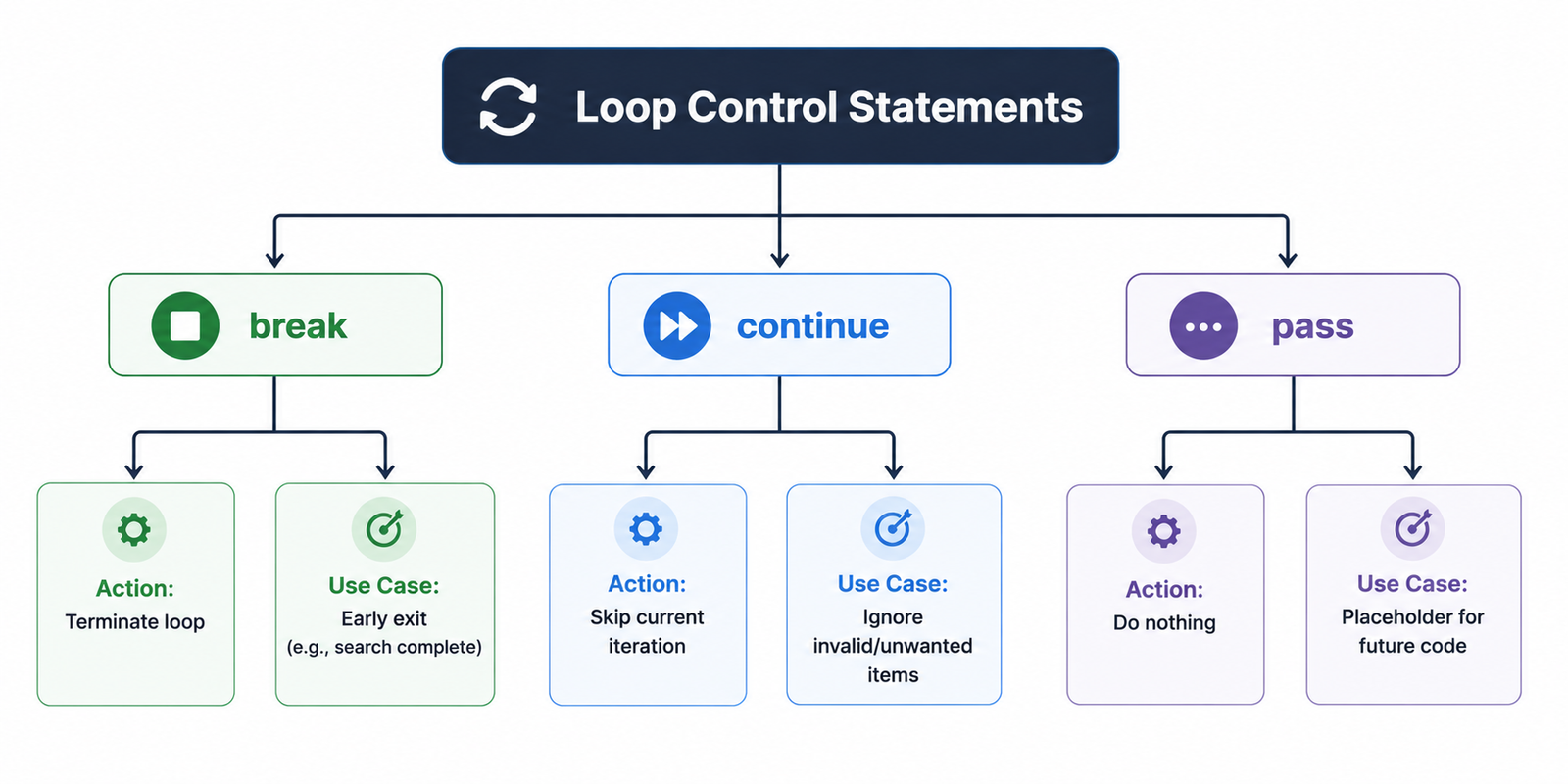
Table of Contents
The break Statement
The break statement **terminates the innermost loop immediately**. Program execution continues
at the first statement after the loop block. It is most commonly used to stop a loop when a specific
condition is met, such as finding a target item.
Step-by-Step Explanation
- The loop starts its normal execution.
- During an iteration, an
ifcondition checks for a specific state. - If the condition is met, the
breakstatement is executed. - The loop stops instantly, and any remaining iterations are cancelled.
- The program jumps to the code immediately following the loop.
Worked Example
for val in range(1, 10):
    if val == 5:
        break  # Exit loop when val reaches 5
    print(val, end=" ")
# Output: 1 2 3 4
Important Note on Nested Loops
In nested loops, break only terminates the innermost loop it is in. The
outer loop will continue its execution. This is a very common interview and exam question.
The continue Statement
The continue statement **skips the rest of the code inside the loop for the current iteration
only**. The loop does not terminate but proceeds directly to the next iteration.
Step-by-Step Explanation
- The loop starts its normal execution.
- During an iteration, an
ifcondition checks for a specific state. - If the condition is met, the
continuestatement is executed. - All code below
continuein the current iteration is skipped. - The loop's control moves to the top to begin the next iteration.
Worked Example
for num in range(1, 6):
    if num == 3:
        continue  # Skip printing 3
    print(num, end=" ")
# Output: 1 2 4 5
The pass Statement
The pass statement is a null operation — when it is executed, nothing happens. It is used as a
placeholder when a statement is required syntactically, but no code needs to be executed. This is common for
creating empty functions, classes, or loop bodies that you plan to implement later.
Why is `pass` needed?
Python's syntax relies on indentation to define blocks. An empty indented block is a syntax error. `pass` solves this by providing a valid, non-functional statement to make the block complete.
Worked Example
def my_future_function():
    pass  # Avoids an IndentationError for an empty function
my_future_function() # Runs without error
Quick Comparison Table
| Statement | Action Performed | Use Case |
|---|---|---|
break |
Terminates the loop entirely. | Stop searching once an item is found. |
continue |
Skips the current iteration only. | Ignore invalid data and process the rest. |
pass |
Does nothing; acts as a placeholder. | Create empty functions or classes for future implementation. |
Common Mistakes & Exam Points
Common Mistakes
- Confusing `break` and `continue`: The most common error. `break` exits completely; `continue` just skips one iteration.
- `break` in Nested Loops: Forgetting that `break` only exits the *inner* loop, not all loops.
- `continue` in `while` loops: Placing `continue` before the update expression (e.g., `i += 1`) can cause an infinite loop.
Exam Notes
- Be prepared to trace the output of a loop containing `break` and `continue`.
- The difference between `break` and `continue` is a classic theory question.
- "When would you use `pass`?" is a common viva/interview question. (Answer: As a placeholder for future code in functions, classes, or conditional blocks).
Interview Questions
1. What is the fundamental difference between `break` and `continue`?
Answer: `break` terminates the entire loop and execution continues after the loop. `continue` terminates only the current iteration and execution jumps to the next iteration of the same loop.
2. What happens when `break` is used inside a nested loop?
Answer: It only breaks out of the innermost loop where it is located. The outer loop(s) will continue to execute normally.
3. Why is the `pass` statement necessary in Python?
Answer: Python's syntax requires indented blocks to contain at least one statement. `pass` is a null statement that can be used as a placeholder in empty functions, classes, or loops to prevent a `SyntaxError`.
Practice Corner
Output Prediction Questions
# Question 1: What is the output?
for i in "Python":
    if i == 'h':
        continue
    print(i, end='')
# Answer: Pyton

# Question 2: What is the output?
i = 0
while i < 10:
    i += 1
    if i == 5:
        break
    print(i, end=' ')
# Answer: 1 2 3 4
Practice Programs
- Write a program to search for a specific number in a list. If the number is found, print "Found" and exit the loop using `break`.
- Write a program that iterates from 1 to 20 but only prints the odd numbers, using `continue` to skip the even numbers.
- Create a simple menu-driven program using a `while` loop that stops when the user enters 'quit'. Use `break` to exit the loop.
Summary
Python's loop control statements give programmers precise control over loop execution.
break
provides an "emergency exit" to terminate a loop immediately. continue acts as a "skip"
button
for the current iteration, allowing the loop to proceed with the next one. Finally, pass is
a
null statement that serves as a syntactic placeholder, ensuring code structure is valid even when logic
is
incomplete. Mastering these three statements is crucial for writing efficient and clean looping code.
Python Programming Handwritten Notes
Master Python Programming with Easy Handwritten Notes – Perfect for Interviews, Placements, GATE & Exams.




