
Unit 2 · List Indexing, Slicing and Operations
List Indexing, Slicing and Operations
Master the core techniques of indexing and slicing on lists, along with concatenation, replication, and membership testing operators.
Introduction
Just like strings, Python lists are ordered sequences — every element occupies a specific position. Because of this, lists support the same kind of indexing (accessing one item) and slicing (extracting a sub-list) techniques that strings do. In addition, Python provides special operators to combine lists, repeat them, and check whether a value exists inside a list.
These skills are essential for everyday programming tasks such as:
- Fetching the first or last item from a list of students.
- Extracting a portion of a list, such as the top 3 scores.
- Merging two shopping carts into one combined list.
- Checking whether a particular username already exists in a list.
Easy Definition
Indexing retrieves a single element using its position number. Slicing extracts a range of elements as a brand-new list.
Real-Life Example
- Attendance register: getting the name of the 1st student → indexing.
- Exam results: extracting marks of the first 5 students → slicing.
- Merging two class lists into one → concatenation.
- Checking if "Rahul" is present in the toppers list → membership testing.
Examination Point of View
- Predicting output of positive/negative index expressions.
- Tracing slicing expressions with start, stop, and step.
- Difference between list concatenation (+) and replication (*).
- Difference between "in" and "not in" operators.
- List slicing vs list indexing — return type differences.
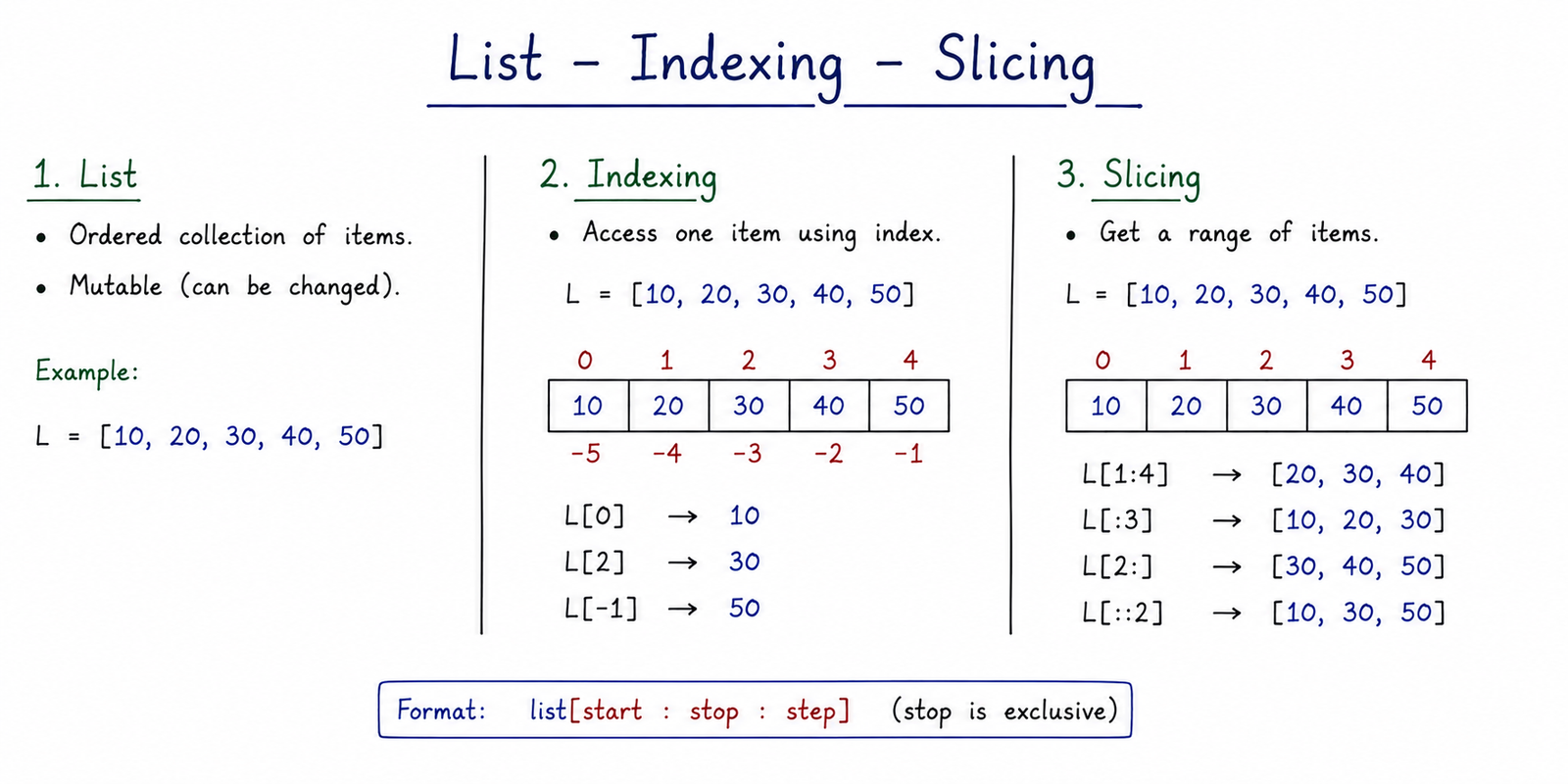
Table of Contents
List Indexing (Positive & Negative)
List indexing works exactly like string indexing — every position in a list has a unique index number:
- Positive indices start from
0at the left and count rightward. - Negative indices start from
-1at the right and count leftward.
letters = ["a", "b", "c", "d"]
print(letters[0])    # a
print(letters[-1])   # d
print(letters[-2])   # c
Index Position Chart
| Element | a | b | c | d |
|---|---|---|---|---|
| Positive Index | 0 | 1 | 2 | 3 |
| Negative Index | -4 | -3 | -2 | -1 |
Warning: Accessing an index that doesn't
exist (e.g., letters[10] on a 4-item list) raises an IndexError.
List Slicing
You can slice a list using the syntax list[start:stop:step]. The result is always a
brand-new list containing the selected subset — the original list is never modified.
start: index where the slice begins (inclusive). Defaults to0.stop: index where the slice ends (exclusive). Defaults to the end of the list.step: the spacing between selected elements. Defaults to1.
Exam Point
The stop index is always excluded from the result. This is the single
most common mistake students make while tracing slicing output.
Slicing Examples
nums = [10, 20, 30, 40, 50, 60]
print(nums[1:4])    # [20, 30, 40]
print(nums[:3])     # [10, 20, 30]
print(nums[3:])     # [40, 50, 60]
print(nums[::2])    # [10, 30, 50] (every second element)
print(nums[::-1])   # [60, 50, 40, 30, 20, 10] (reversed)
print(nums[:])      # full shallow copy of the list
Real-Life Examples
| Situation | Slice Expression |
|---|---|
| Top 3 scores from a leaderboard | scores[:3] |
| Last 5 transactions | transactions[-5:] |
| Reverse a playlist | playlist[::-1] |
| Every alternate item in an inventory list | items[::2] |
Important Note
Unlike indexing, slicing never raises an IndexError even if the range goes beyond the
list length — Python simply returns whatever elements are available (or an empty list).
Concatenation and Replication
You can combine or repeat lists using arithmetic-like operators — this is one of Python's most beginner-friendly features:
- Concatenation (
+): joins two lists together into a new, combined list. - Replication (
*): repeats the entire list a specified number of times.
list_a = [1, 2]
list_b = [3, 4]
combined = list_a + list_b
print(combined)       # [1, 2, 3, 4]

repeated = list_a * 3
print(repeated)       # [1, 2, 1, 2, 1, 2]
Memory Trick
+ = "Join together" * = "Repeat". Just like with numbers and strings, these two symbols keep their intuitive meaning for lists too.
Warning: The + operator
requires both operands to be lists. Writing list_a + 5 raises a
TypeError. Neither operation changes the original lists — both return a new list.
Membership Testing (in, not in)
You can test whether an item exists inside a list using the membership operators in and
not in. These operators scan the list and return a Boolean result.
colors = ["red", "green", "blue"]
print("red" in colors)       # True
print("yellow" in colors)    # False
print("yellow" not in colors) # True
Real-Life Examples
| Situation | Expression |
|---|---|
| Check if username already registered | "rahul123" in usernames |
| Verify a product code is not blacklisted | code not in blacklist |
| Check for allergy ingredient in a recipe | "nuts" in ingredients |
Common Mistakes
- Confusing indexing (single element) with slicing (always returns a list).
- Forgetting that the
stopindex in slicing is exclusive. - Using a negative index beyond the list's length, causing an
IndexError. - Assuming
list_a + list_bmodifieslist_a— it doesn't; it creates a new list. - Writing
list * "3"instead oflist * 3(must be an integer).
Important Examination Points
- Indexing returns a single element; slicing always returns a new list.
- Negative indexing counts from the end, starting at -1.
list[::-1]reverses a list without changing the original.+concatenates;*replicates — both return new lists.in/not inreturn Boolean values only.- Slicing out of range does not raise an error; indexing out of range does.
Interview Questions
- What is the difference between list indexing and list slicing?
- How would you reverse a list using slicing?
- What is the output of
[1,2,3] + [4,5]? - What is the output of
[1,2] * 2? - How do you check whether an element exists in a list?
- Does slicing raise an error if the range exceeds the list length?
Practice MCQs
1. What is the output?
nums = [10, 20, 30, 40, 50]
print(nums[1:4])
Answer: [20, 30, 40]
2. What is the output?
a = [1, 2]
b = [3, 4]
print(a * 2)
Answer: [1, 2, 1, 2]
3. Which operator checks whether an item does NOT exist in a list?
A) in B) not in C) != D) exists
Answer: B) not in
4. What is the output of [1,2,3,4,5][::-1]?
Answer: [5, 4, 3, 2, 1]
Summary
Python lists support sequence-based indexing (0 to length-1, or -1 to -length from the end) and
flexible slicing extraction rules with [start:stop:step]. Basic operators include
+ for concatenation, * for replication, and in/not in
for fast membership testing — all of which return new results without modifying the original list.




